# My Schedule


# Overview

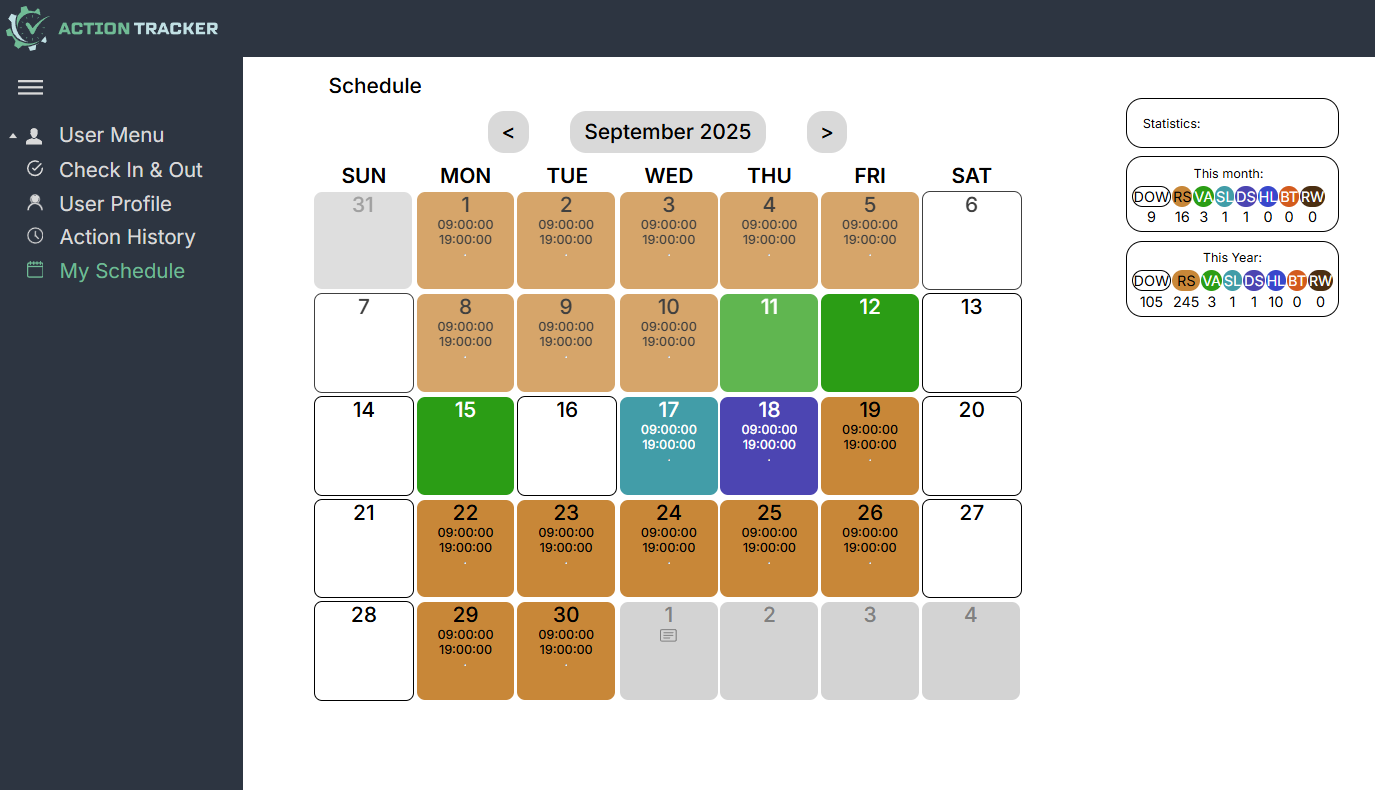
<span style="font-size: 12pt; font-family: Arial,sans-serif; color: #000000; background-color: transparent; font-weight: 400; font-style: normal; font-variant: normal; text-decoration: none; vertical-align: baseline; white-space: pre-wrap;">Розділ My Schedule призначений для позначення свого графіка зайнятості на найближчий час і надає можливість</span>

<span style="font-size: 12pt; font-family: Arial,sans-serif; color: #000000; background-color: transparent; font-weight: 400; font-style: normal; font-variant: normal; text-decoration: none; vertical-align: baseline; white-space: pre-wrap;">- позначити day-off/вихідні (якщо графік зайнятості відрізняється від стандартного),</span>

<span style="font-size: 12pt; font-family: Arial,sans-serif; color: #000000; background-color: transparent; font-weight: 400; font-style: normal; font-variant: normal; text-decoration: none; vertical-align: baseline; white-space: pre-wrap;">- позначити регулярні зміни,</span>

<span style="font-size: 12pt; font-family: Arial,sans-serif; color: #000000; background-color: transparent; font-weight: 400; font-style: normal; font-variant: normal; text-decoration: none; vertical-align: baseline; white-space: pre-wrap;">- позначити лікарняні,</span>

<span style="font-size: 12pt; font-family: Arial,sans-serif; color: #000000; background-color: transparent; font-weight: 400; font-style: normal; font-variant: normal; text-decoration: none; vertical-align: baseline; white-space: pre-wrap;">- запланувати пільговий період,</span>

<span style="font-size: 12pt; font-family: Arial,sans-serif; color: #000000; background-color: transparent; font-weight: 400; font-style: normal; font-variant: normal; text-decoration: none; vertical-align: baseline; white-space: pre-wrap;">- позначити чергові зміни,</span>

<span style="font-size: 12pt; font-family: Arial,sans-serif; color: #000000; background-color: transparent; font-weight: 400; font-style: normal; font-variant: normal; text-decoration: none; vertical-align: baseline; white-space: pre-wrap;">- позначити нестандартні графіки,</span>

<span style="font-size: 12pt; font-family: Arial,sans-serif; color: #000000; background-color: transparent; font-weight: 400; font-style: normal; font-variant: normal; text-decoration: none; vertical-align: baseline; white-space: pre-wrap;">- залишити коментарі.</span>

[![](https://usrman.a-tracker.net/uploads/images/gallery/2025-09/scaled-1680-/image-1757687122813.png)](https://usrman.a-tracker.net/uploads/images/gallery/2025-09/image-1757687122813.png)

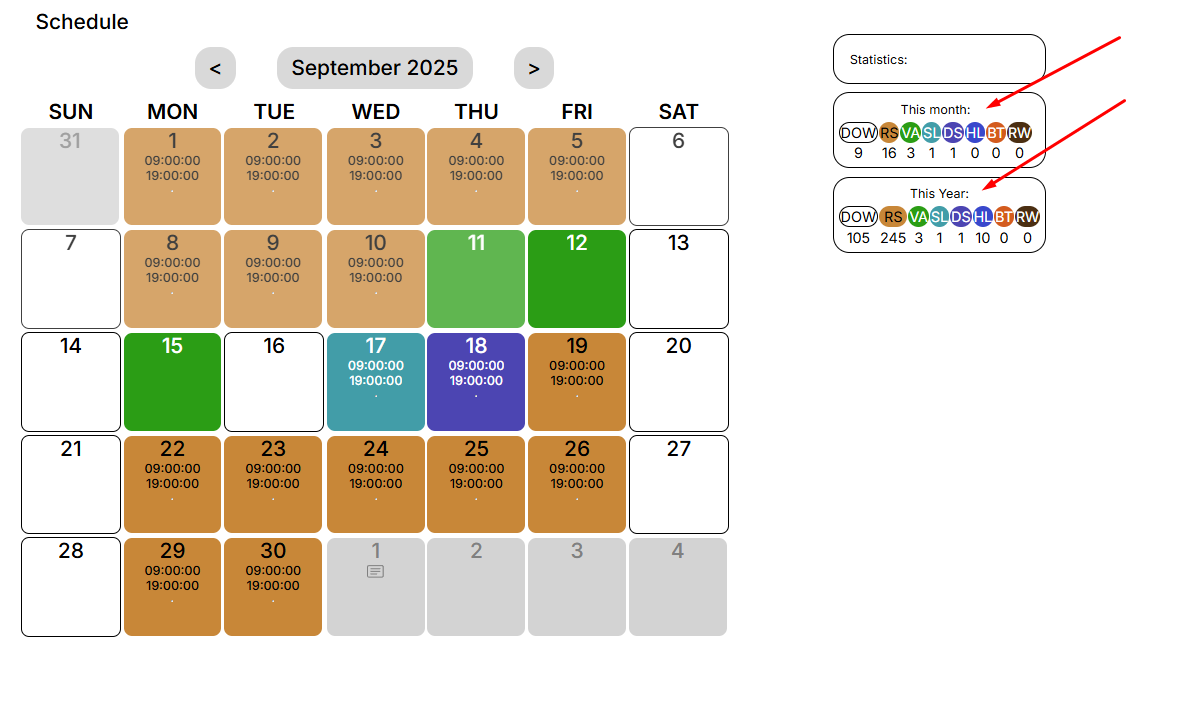
<span style="font-size: 12pt; font-family: Arial,sans-serif; color: #000000; background-color: transparent; font-weight: 400; font-style: normal; font-variant: normal; text-decoration: none; vertical-align: baseline; white-space: pre-wrap;">Праворуч у вікні показана щомісячна та річна статистика</span>

[![](https://usrman.a-tracker.net/uploads/images/gallery/2025-09/scaled-1680-/image-1757687206111.png)](https://usrman.a-tracker.net/uploads/images/gallery/2025-09/image-1757687206111.png)

# Планування свого графіка зайнятості

<span style="font-size: 12pt; font-family: Arial,sans-serif; color: #000000; background-color: transparent; font-weight: 400; font-style: normal; font-variant: normal; text-decoration: none; vertical-align: baseline; white-space: pre-wrap;">Вибравши тип днів, які необхідно додати до графіка зайнятості, можна вказати бажані дати для обраної події.</span>

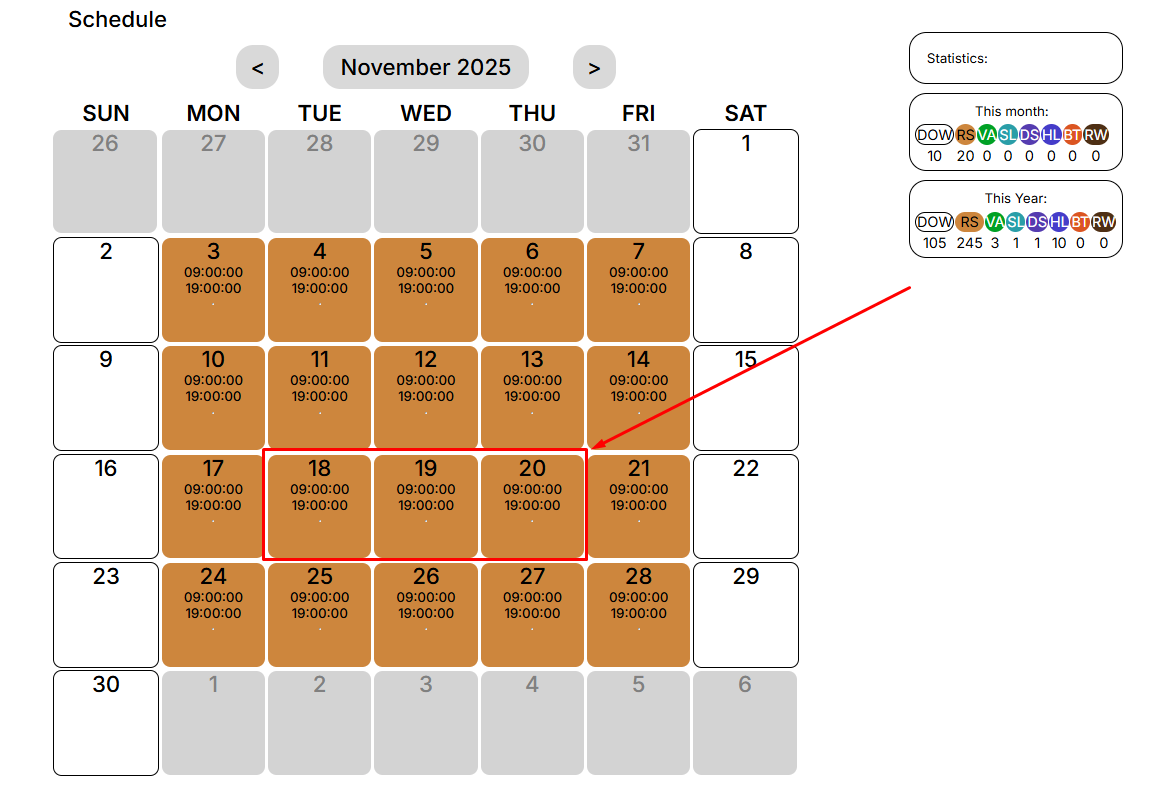
<span style="font-size: 12pt; font-family: Arial,sans-serif; color: #000000; background-color: transparent; font-weight: 400; font-style: normal; font-variant: normal; text-decoration: none; vertical-align: baseline; white-space: pre-wrap;">Для цього необхідно вибрати цікавий для вас день (або декілька днів):</span>

[![](https://usrman.a-tracker.net/uploads/images/gallery/2025-09/scaled-1680-/image-1757687323265.png)](https://usrman.a-tracker.net/uploads/images/gallery/2025-09/image-1757687323265.png)

<span style="font-size: 12pt; font-family: Arial,sans-serif; color: #000000; background-color: transparent; font-weight: 400; font-style: normal; font-variant: normal; text-decoration: none; vertical-align: baseline; white-space: pre-wrap;">Після цього перед вами відкриється вікно редагування графіка зайнятості:</span>

[![](https://usrman.a-tracker.net/uploads/images/gallery/2025-09/scaled-1680-/image-1757687484588.png)](https://usrman.a-tracker.net/uploads/images/gallery/2025-09/image-1757687484588.png)

**<span style="font-size: 12pt; font-family: Arial,sans-serif; color: #000000; background-color: transparent; font-weight: 400; font-style: normal; font-variant: normal; text-decoration: none; vertical-align: baseline; white-space: pre-wrap;">У цьому вікні ви можете:</span>**

**<span style="font-size: 12pt; font-family: Arial,sans-serif; color: #000000; background-color: transparent; font-weight: 400; font-style: normal; font-variant: normal; text-decoration: none; vertical-align: baseline; white-space: pre-wrap;">- вибрати дні для внесення певного типу графіка зайнятості,</span>**

**<span style="font-size: 12pt; font-family: Arial,sans-serif; color: #000000; background-color: transparent; font-weight: 400; font-style: normal; font-variant: normal; text-decoration: none; vertical-align: baseline; white-space: pre-wrap;">- вибрати тип графіка зайнятості,</span>**

**<span style="font-size: 12pt; font-family: Arial,sans-serif; color: #000000; background-color: transparent; font-weight: 400; font-style: normal; font-variant: normal; text-decoration: none; vertical-align: baseline; white-space: pre-wrap;">- залишити коментар, якщо це необхідно (він буде видимий вашому керівнику).</span>**

<span style="font-size: 12pt; font-family: Arial,sans-serif; color: #000000; background-color: transparent; font-weight: 400; font-style: normal; font-variant: normal; text-decoration: none; vertical-align: baseline; white-space: pre-wrap;">Щоб завершити та зберегти додані події, натискаємо кнопку “Submit”. </span>

<span style="font-size: 12pt; font-family: Arial,sans-serif; color: #000000; background-color: transparent; font-weight: 400; font-style: normal; font-variant: normal; text-decoration: none; vertical-align: baseline; white-space: pre-wrap;">Щоб скасувати зміни, натискаємо “Cancel”. </span>

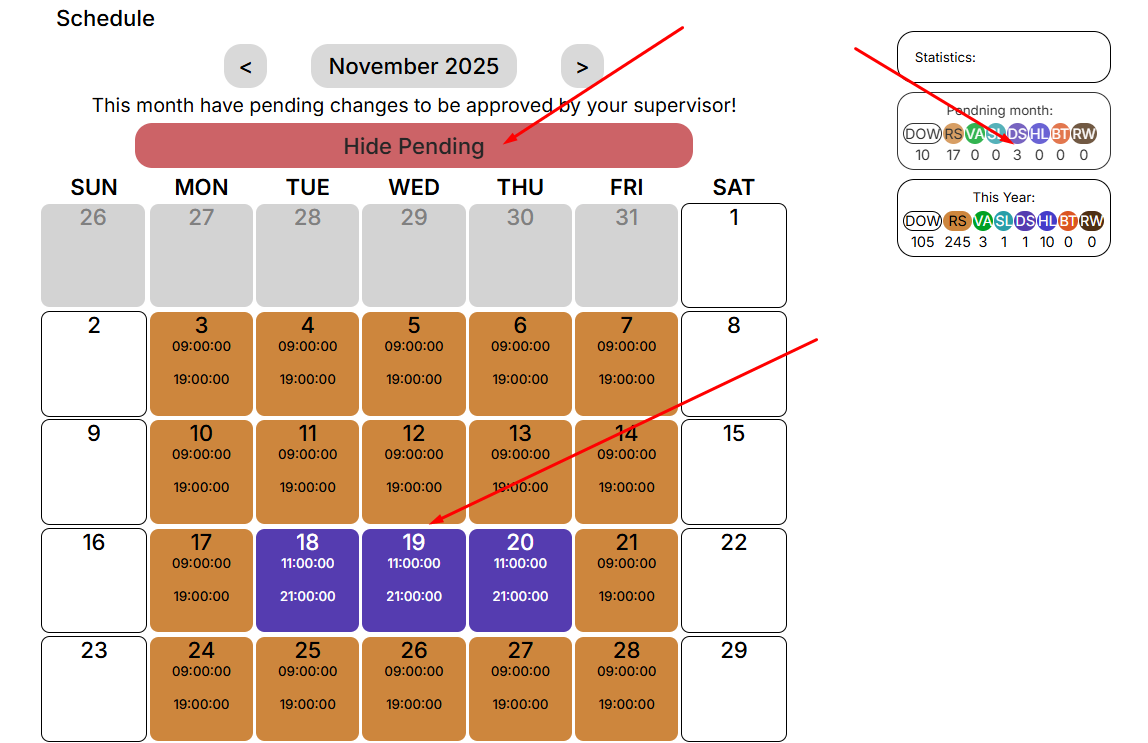
<span style="font-size: 12pt; font-family: Arial,sans-serif; color: #000000; background-color: transparent; font-weight: 400; font-style: normal; font-variant: normal; text-decoration: none; vertical-align: baseline; white-space: pre-wrap;">Після збереження змін з'явиться повідомлення про необхідність отримати погодження від вашого керівника.</span>

[![](https://usrman.a-tracker.net/uploads/images/gallery/2025-09/scaled-1680-/image-1757687563670.png)](https://usrman.a-tracker.net/uploads/images/gallery/2025-09/image-1757687563670.png)

<span style="font-size: 12pt; font-family: Arial,sans-serif; color: #000000; background-color: transparent; font-weight: 400; font-style: normal; font-variant: normal; text-decoration: none; vertical-align: baseline; white-space: pre-wrap;">Статистика відображає кількість обраних днів для кожної події.</span>

### <span style="font-size: 13.999999999999998pt; font-family: Arial,sans-serif; color: #434343; background-color: transparent; font-weight: bold; font-style: italic; font-variant: normal; text-decoration: none; vertical-align: baseline; white-space: pre-wrap;">Важливо: не можна заднім числом позначати дні в календарі.</span>

# Приклад планування пільгового періоду

<span style="font-size: 12pt; font-family: Arial,sans-serif; color: #000000; background-color: transparent; font-weight: 400; font-style: normal; font-variant: normal; text-decoration: none; vertical-align: baseline; white-space: pre-wrap;">У цьому прикладі ми плануємо пільговий період на перші дні червня.</span>

<span style="font-size: 12pt; font-family: Arial,sans-serif; color: #000000; background-color: transparent; font-weight: 400; font-style: normal; font-variant: normal; text-decoration: none; vertical-align: baseline; white-space: pre-wrap;">1. Перейдіть в розділ "My Schedule", а потім прокрутіть календар до потрібного місяця.</span>

[![](https://usrman.a-tracker.net/uploads/images/gallery/2024-07/scaled-1680-/image-1721299199666.png)](https://usrman.a-tracker.net/uploads/images/gallery/2024-07/image-1721299199666.png)

<span style="font-size: 12pt; font-family: Arial,sans-serif; color: #000000; background-color: transparent; font-weight: 400; font-style: normal; font-variant: normal; text-decoration: none; vertical-align: baseline; white-space: pre-wrap;">2. Виділіть дати запланованої відпустки курсором миші (наприклад, з 7 по 11 число).</span>

[![](https://usrman.a-tracker.net/uploads/images/gallery/2024-07/scaled-1680-/image-1721307564784.png)](https://usrman.a-tracker.net/uploads/images/gallery/2024-07/image-1721307564784.png)

<span style="font-size: 12pt; font-family: Arial,sans-serif; color: #000000; background-color: transparent; font-weight: 400; font-style: normal; font-variant: normal; text-decoration: none; vertical-align: baseline; white-space: pre-wrap;">3. Позначте першу неділю червня як пільговий період, обравши правильний тип графіка (</span><span style="font-size: 12pt; font-family: Arial,sans-serif; color: #000000; background-color: transparent; font-weight: 400; font-style: italic; font-variant: normal; text-decoration: none; vertical-align: baseline; white-space: pre-wrap;">важливо: неможливо позначити дні у відпустці у ретроспективі.</span><span style="font-size: 12pt; font-family: Arial,sans-serif; color: #000000; background-color: transparent; font-weight: 400; font-style: normal; font-variant: normal; text-decoration: none; vertical-align: baseline; white-space: pre-wrap;">):</span>

[![](https://usrman.a-tracker.net/uploads/images/gallery/2024-07/scaled-1680-/image-1721307776188.png)](https://usrman.a-tracker.net/uploads/images/gallery/2024-07/image-1721307776188.png)

<span style="font-size: 12pt; font-family: Arial,sans-serif; color: #000000; background-color: transparent; font-weight: 400; font-style: normal; font-variant: normal; text-decoration: none; vertical-align: baseline; white-space: pre-wrap;">4. Після позначення бажаного пільгового періоду натисніть "Підтвердити" (якщо ви не бажаєте зберігати зміни, натисніть "Скасувати", і таблиця повернеться до попереднього стану).</span>

[![](https://usrman.a-tracker.net/uploads/images/gallery/2024-07/scaled-1680-/image-1721307880257.png)](https://usrman.a-tracker.net/uploads/images/gallery/2024-07/image-1721307880257.png)

<span style="font-size: 12pt; font-family: Arial,sans-serif; color: #000000; background-color: transparent; font-weight: 400; font-style: normal; font-variant: normal; text-decoration: none; vertical-align: baseline; white-space: pre-wrap;">5. Після збереження вас проінформують, що зміни, внесені в графік, повинні бути затверджені вашим керівником.</span>

[![](https://usrman.a-tracker.net/uploads/images/gallery/2024-07/scaled-1680-/image-1721307975032.png)](https://usrman.a-tracker.net/uploads/images/gallery/2024-07/image-1721307975032.png)

<span style="font-size: 12pt; font-family: Arial,sans-serif; color: #000000; background-color: transparent; font-weight: 400; font-style: normal; font-variant: normal; text-decoration: none; vertical-align: baseline; white-space: pre-wrap;">6. Повідомте свого менеджера про зміни в графіку.</span>