# Planning your schedule

<span style="font-size: 12pt; font-family: Arial,sans-serif; color: #000000; background-color: transparent; font-weight: 400; font-style: normal; font-variant: normal; text-decoration: none; vertical-align: baseline; white-space: pre-wrap;">By choosing the type of days you want to schedule, you can specify the desired dates for the selected event. </span>

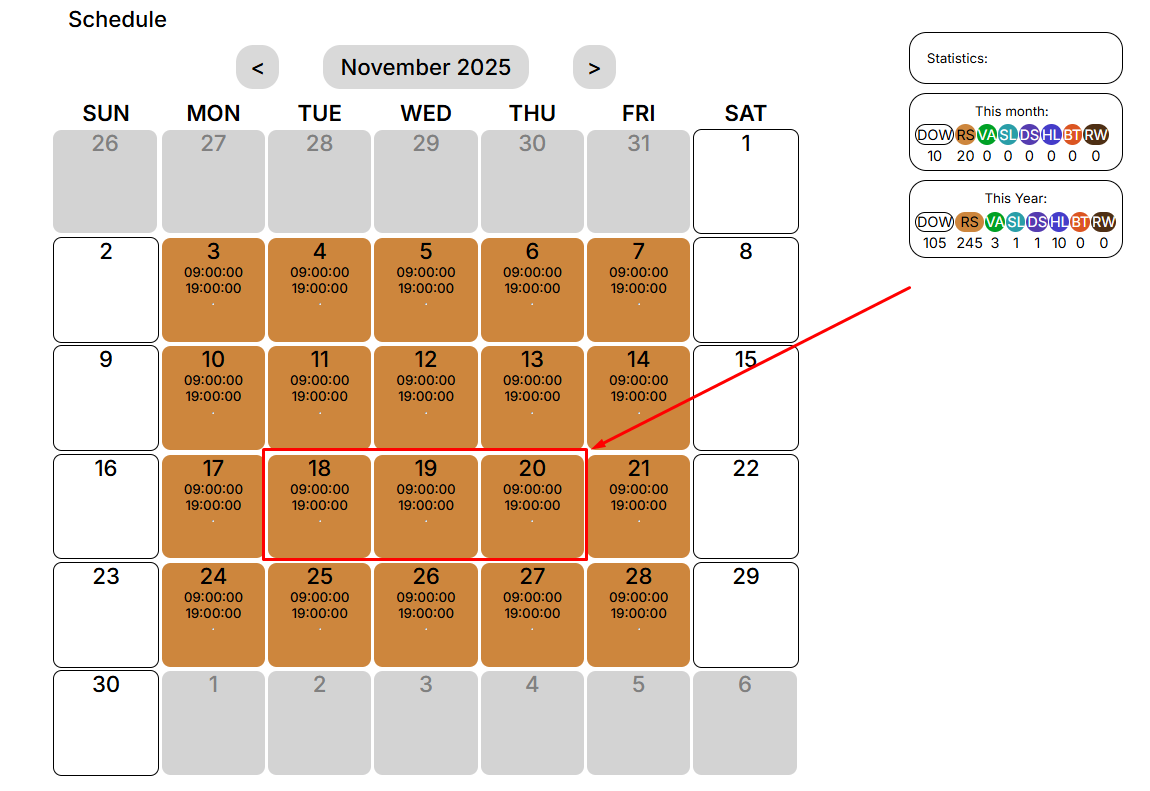
<span style="font-size: 12pt; font-family: Arial,sans-serif; color: #000000; background-color: transparent; font-weight: 400; font-style: normal; font-variant: normal; text-decoration: none; vertical-align: baseline; white-space: pre-wrap;">To do this, you need to select the day (or days) that interest you:</span>

[![](https://usrman.a-tracker.net/uploads/images/gallery/2025-09/scaled-1680-/image-1757687347535.png)](https://usrman.a-tracker.net/uploads/images/gallery/2025-09/image-1757687347535.png)

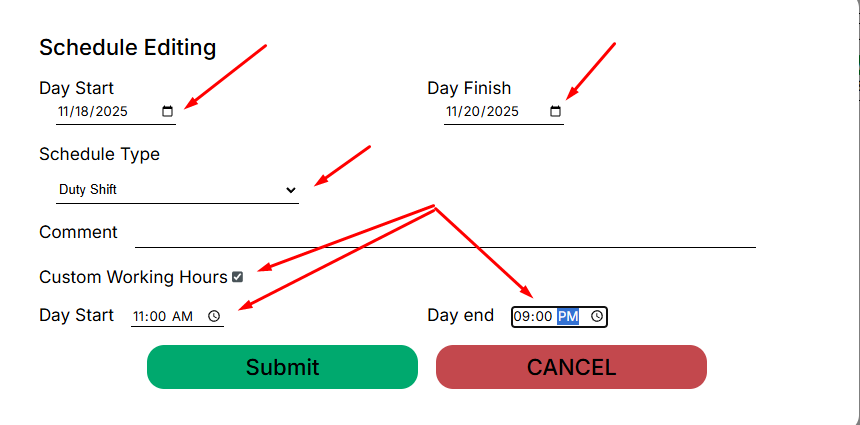
<span style="font-size: 12pt; font-family: Arial,sans-serif; color: #000000; background-color: transparent; font-weight: 400; font-style: normal; font-variant: normal; text-decoration: none; vertical-align: baseline; white-space: pre-wrap;">After that, an editing window for the schedule will open in front of you:</span>

[![](https://usrman.a-tracker.net/uploads/images/gallery/2025-09/scaled-1680-/image-1757687497813.png)](https://usrman.a-tracker.net/uploads/images/gallery/2025-09/image-1757687497813.png)

**<span style="font-size: 12pt; font-family: Arial,sans-serif; color: #000000; background-color: transparent; font-weight: 400; font-style: normal; font-variant: normal; text-decoration: none; vertical-align: baseline; white-space: pre-wrap;">In this window, you can:</span>**

**<span style="font-size: 12pt; font-family: Arial,sans-serif; color: #000000; background-color: transparent; font-weight: 400; font-style: normal; font-variant: normal; text-decoration: none; vertical-align: baseline; white-space: pre-wrap;">- select the days for applying a specific type of work schedule,</span>**

**<span style="font-size: 12pt; font-family: Arial,sans-serif; color: #000000; background-color: transparent; font-weight: 400; font-style: normal; font-variant: normal; text-decoration: none; vertical-align: baseline; white-space: pre-wrap;">- choose the type of work schedule,</span>**

**<span style="font-size: 12pt; font-family: Arial,sans-serif; color: #000000; background-color: transparent; font-weight: 400; font-style: normal; font-variant: normal; text-decoration: none; vertical-align: baseline; white-space: pre-wrap;">- leave a comment, if necessary (it will be visible to your supervisor),</span>**

**<span style="font-size: 12pt; font-family: Arial,sans-serif; color: #000000; background-color: transparent; font-weight: 400; font-style: normal; font-variant: normal; text-decoration: none; vertical-align: baseline; white-space: pre-wrap;">-specify a non-standard work schedule (if it involves a duty shift or if you have agreed on such a schedule with your supervisor).</span>**

<span style="font-size: 12pt; font-family: Arial,sans-serif; color: #000000; background-color: transparent; font-weight: 400; font-style: normal; font-variant: normal; text-decoration: none; vertical-align: baseline; white-space: pre-wrap;">To complete and save the added events, click “Submit”.</span>

<span style="font-size: 12pt; font-family: Arial,sans-serif; color: #000000; background-color: transparent; font-weight: 400; font-style: normal; font-variant: normal; text-decoration: none; vertical-align: baseline; white-space: pre-wrap;">To cancel the changes, press “Cancel”.</span>

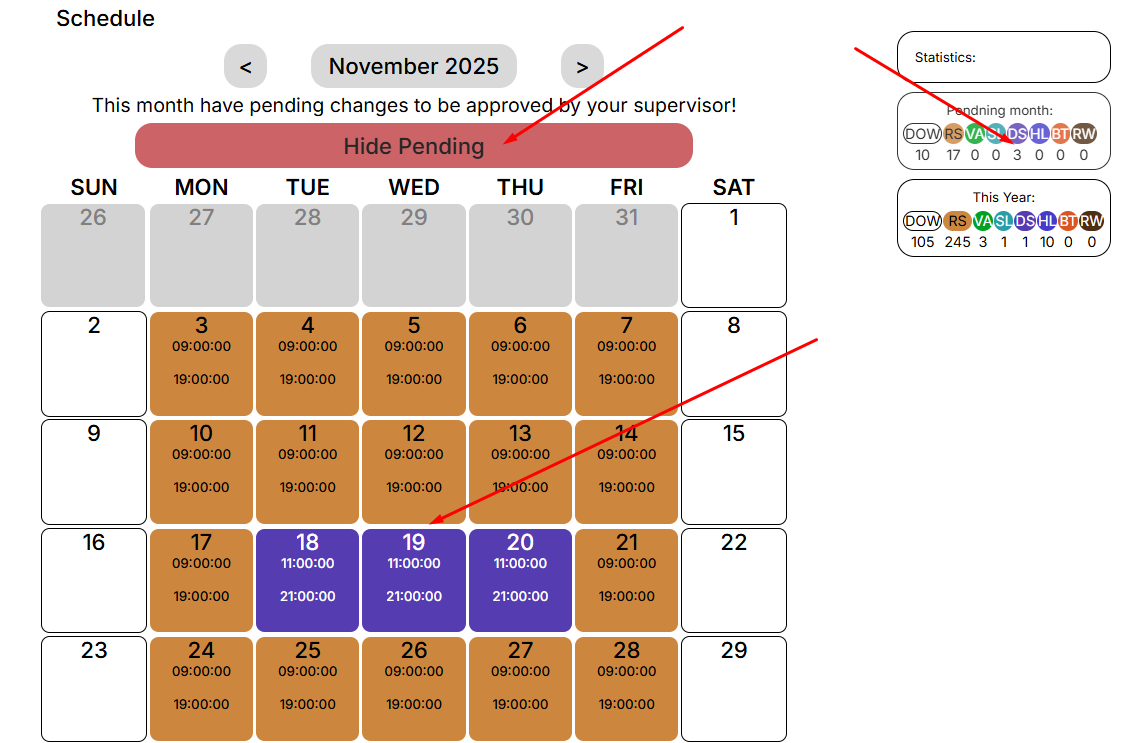
<span style="font-size: 12pt; font-family: Arial,sans-serif; color: #000000; background-color: transparent; font-weight: 400; font-style: normal; font-variant: normal; text-decoration: none; vertical-align: baseline; white-space: pre-wrap;">After you save the changes, you will be notified that you need to receive approval from your manager.</span>

[![](https://usrman.a-tracker.net/uploads/images/gallery/2025-09/scaled-1680-/image-1757687578053.png)](https://usrman.a-tracker.net/uploads/images/gallery/2025-09/image-1757687578053.png)

<span style="font-size: 12pt; font-family: Arial,sans-serif; color: #000000; background-color: transparent; font-weight: 400; font-style: normal; font-variant: normal; text-decoration: none; vertical-align: baseline; white-space: pre-wrap;">The statistics will display the number of selected days for each event.</span>

<span style="font-weight: normal;"> </span>

### <span style="font-size: 13.999999999999998pt; font-family: Arial,sans-serif; color: #434343; background-color: transparent; font-weight: bold; font-style: italic; font-variant: normal; text-decoration: none; vertical-align: baseline; white-space: pre-wrap;">Important: you cannot mark the days in the calendar retroactively.</span>