# Action Tracker WEB User Manual English

# Action Tracker WEB Notifications

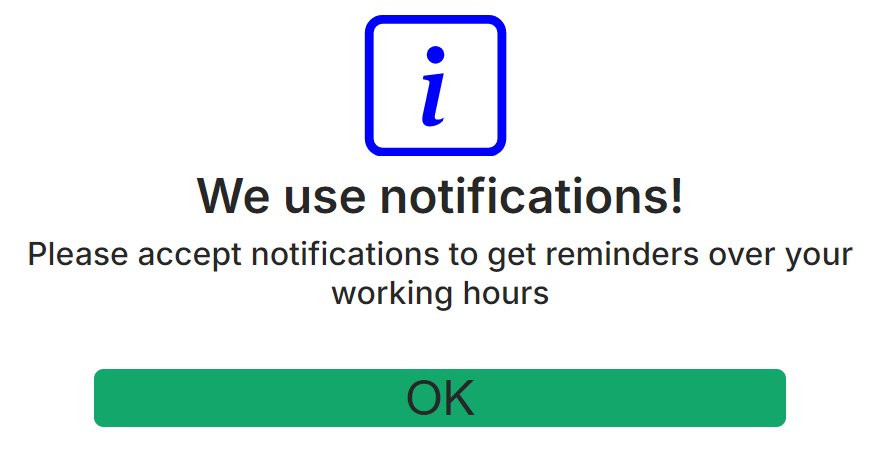
<span style="font-size: 12pt; font-family: Arial,sans-serif; color: #000000; background-color: transparent; font-weight: 400; font-style: normal; font-variant: normal; text-decoration: none; vertical-align: baseline; white-space: pre-wrap;">To improve the user experience of the Action Tracker system, our team has added a notification feature that will be displayed on your PC when you need to perform a Check IN/Check OUT or Pause Stop. Upon logging into the system, you will be prompted to enable this functionality:</span>

[![](https://usrman.a-tracker.net/uploads/images/gallery/2024-08/scaled-1680-/image-1722845433930.png)](https://usrman.a-tracker.net/uploads/images/gallery/2024-08/image-1722845433930.png)

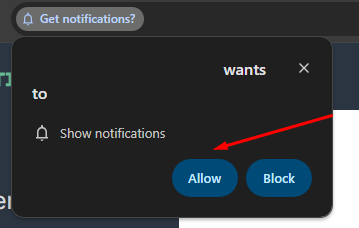
<span style="font-size: 12pt; font-family: Arial,sans-serif; color: #000000; background-color: transparent; font-weight: 400; font-style: normal; font-variant: normal; text-decoration: none; vertical-align: baseline; white-space: pre-wrap;">After pressing the OK button, your browser will prompt you to enable notifications from the website a-tracker.net:</span>

[![](https://usrman.a-tracker.net/uploads/images/gallery/2024-08/scaled-1680-/image-1722845517602.png)](https://usrman.a-tracker.net/uploads/images/gallery/2024-08/image-1722845517602.png)

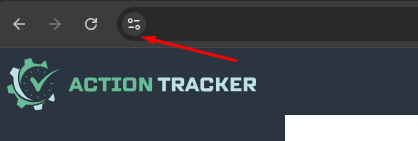
<span style="font-size: 12pt; font-family: Arial,sans-serif; color: #000000; background-color: transparent; font-weight: 400; font-style: normal; font-variant: normal; text-decoration: none; vertical-align: baseline; white-space: pre-wrap;">If for any reason this did not happen, you can manually enable or disable the notification feature in the website settings:</span>

[![](https://usrman.a-tracker.net/uploads/images/gallery/2024-08/scaled-1680-/image-1722845589403.png)](https://usrman.a-tracker.net/uploads/images/gallery/2024-08/image-1722845589403.png)

[![](https://usrman.a-tracker.net/uploads/images/gallery/2024-08/scaled-1680-/image-1722845675214.png)](https://usrman.a-tracker.net/uploads/images/gallery/2024-08/image-1722845675214.png)
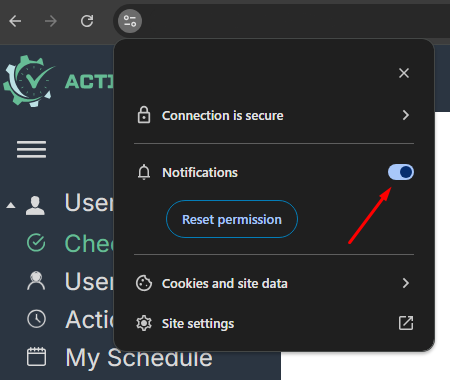
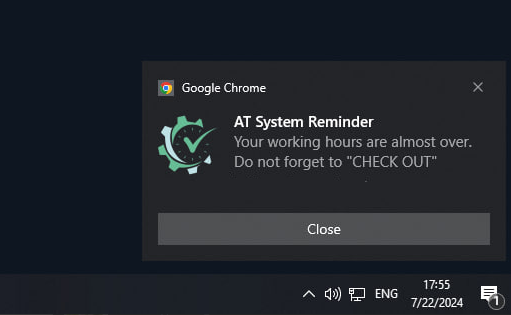
<span style="font-size: 12pt; font-family: Arial,sans-serif; color: #000000; background-color: transparent; font-weight: 400; font-style: normal; font-variant: normal; text-decoration: none; vertical-align: baseline; white-space: pre-wrap;">Once you have configured notifications, the system will be able to send you reminders to perform Check IN or Check OUT as needed.</span>

[![](https://usrman.a-tracker.net/uploads/images/gallery/2024-08/scaled-1680-/image-1722845758379.png)](https://usrman.a-tracker.net/uploads/images/gallery/2024-08/image-1722845758379.png)

# Authorization in the system

<span style="font-size: 12pt; font-family: Arial,sans-serif; color: #000000; background-color: transparent; font-weight: 400; font-style: normal; font-variant: normal; text-decoration: none; vertical-align: baseline; white-space: pre-wrap;">- Go to the </span>[<span style="font-size: 12pt; font-family: Arial,sans-serif; color: #1155cc; background-color: transparent; font-weight: 400; font-style: normal; font-variant: normal; text-decoration: underline; -webkit-text-decoration-skip: none; text-decoration-skip-ink: none; vertical-align: baseline; white-space: pre-wrap;">a-tracker.net</span>](https://a-tracker.net/)<span style="font-size: 12pt; font-family: Arial,sans-serif; color: #000000; background-color: transparent; font-weight: 400; font-style: normal; font-variant: normal; text-decoration: none; vertical-align: baseline; white-space: pre-wrap;"> website.</span>

<span style="font-size: 12pt; font-family: Arial,sans-serif; color: #000000; background-color: transparent; font-weight: 400; font-style: normal; font-variant: normal; text-decoration: none; vertical-align: baseline; white-space: pre-wrap;">- Use a corporate Google account for authorization.</span>

[![image.png](https://usrman.a-tracker.net/uploads/images/gallery/2024-07/scaled-1680-/image.png)](http://172.16.2.18:6882/uploads/images/gallery/2024-07/image.png)

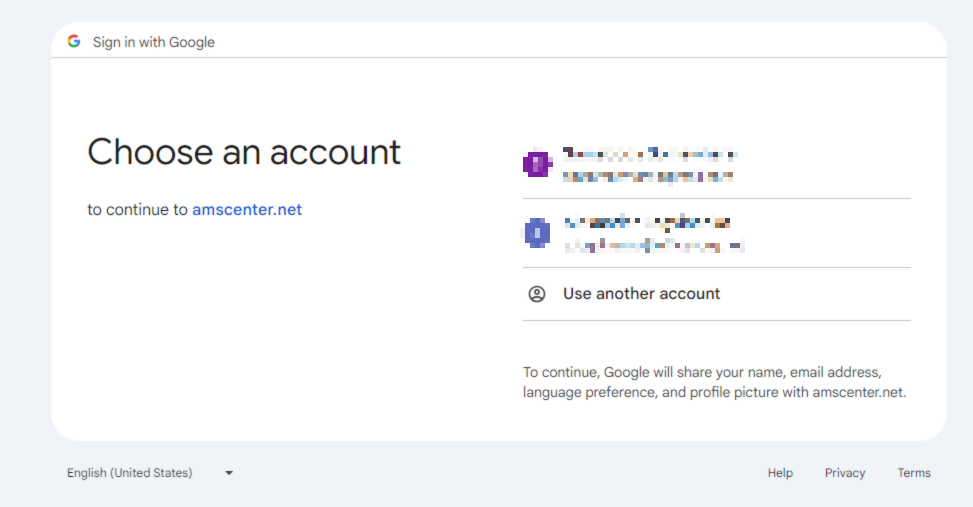
<span style="font-size: 12pt; font-family: Arial,sans-serif; color: #000000; background-color: transparent; font-weight: 400; font-style: normal; font-variant: normal; text-decoration: none; vertical-align: baseline; white-space: pre-wrap;">- If you have multiple authorized Google accounts, you will be asked to choose which one to log in with. Select the email you received invitation to the system to or your primary corporate account.</span>

[![image.png](https://usrman.a-tracker.net/uploads/images/gallery/2024-07/scaled-1680-/L4Ximage.png)](http://172.16.2.18:6882/uploads/images/gallery/2024-07/L4Ximage.png)

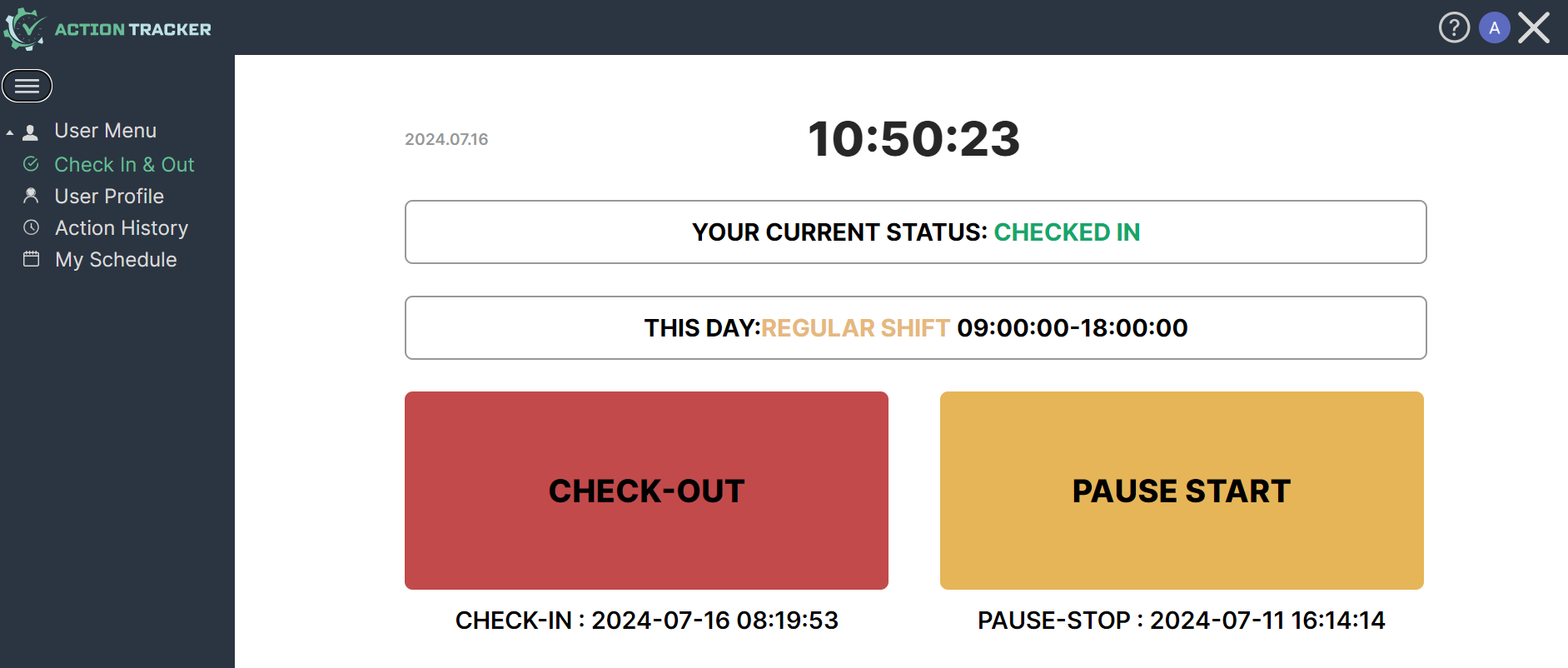
<span style="font-size: 12pt; font-family: Arial,sans-serif; color: #000000; background-color: transparent; font-weight: 400; font-style: normal; font-variant: normal; text-decoration: none; vertical-align: baseline; white-space: pre-wrap;">- After successful authorization, you see the main page of the system.</span>

[![](https://usrman.a-tracker.net/uploads/images/gallery/2024-07/scaled-1680-/image-1721116311377.png)](http://172.16.2.18:6882/uploads/images/gallery/2024-07/image-1721116311377.png)

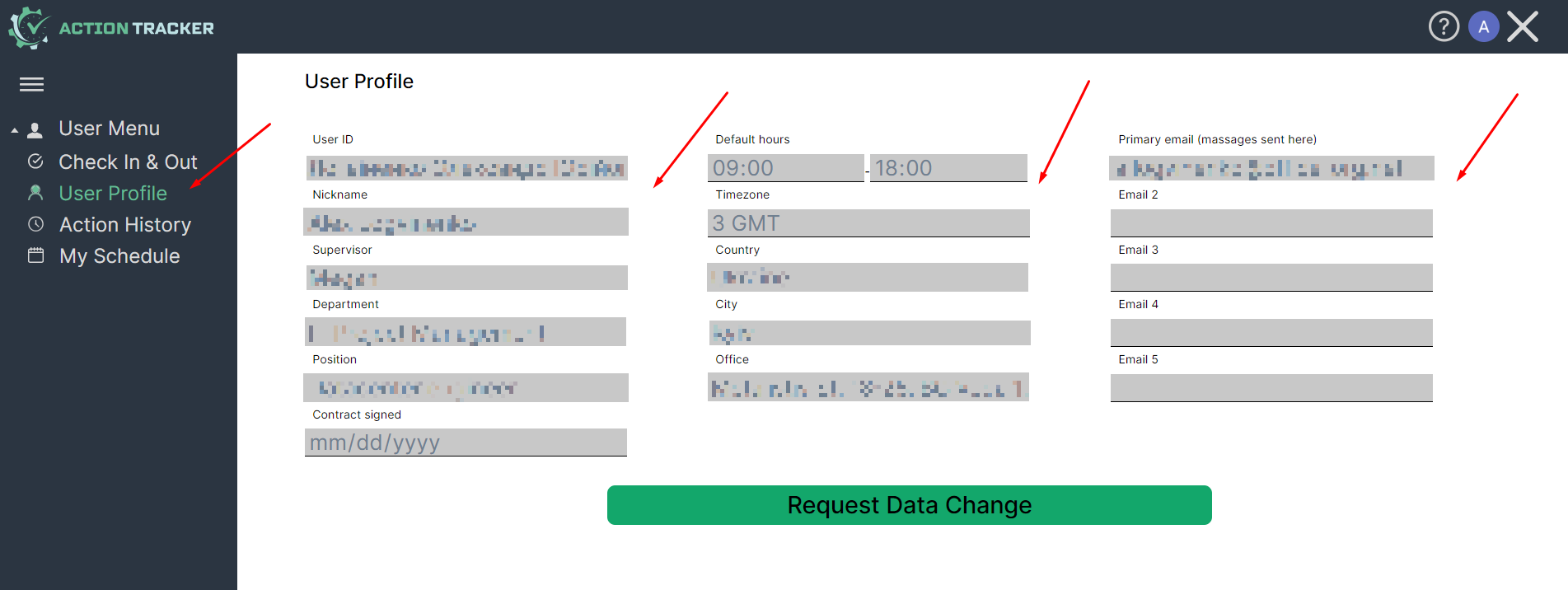
<span style="font-size: 12pt; font-family: Arial,sans-serif; color: #000000; background-color: transparent; font-weight: 400; font-style: normal; font-variant: normal; text-decoration: none; vertical-align: baseline; white-space: pre-wrap;">- Before checking in, check the correctness of the specified user data, working schedule, and work time zone. You can do it in User Profile section. If the data is incorrect, contact support: </span>[<span style="font-size: 12pt; font-family: Arial,sans-serif; color: #1155cc; background-color: transparent; font-weight: 400; font-style: normal; font-variant: normal; text-decoration: underline; -webkit-text-decoration-skip: none; text-decoration-skip-ink: none; vertical-align: baseline; white-space: pre-wrap;">support.team@a-tracker.net</span>](mailto:support.team@a-tracker.net)<span style="font-size: 12pt; font-family: Arial,sans-serif; color: #000000; background-color: transparent; font-weight: 400; font-style: normal; font-variant: normal; text-decoration: none; vertical-align: baseline; white-space: pre-wrap;">, or make request to change your data using Request Data Change button.</span>

[![](https://usrman.a-tracker.net/uploads/images/gallery/2024-07/scaled-1680-/image-1721116746462.png)](https://usrman.a-tracker.net/uploads/images/gallery/2024-07/image-1721116746462.png)

<span style="font-size: 12pt; font-family: Arial,sans-serif; color: #000000; background-color: transparent; font-weight: 400; font-style: normal; font-variant: normal; text-decoration: none; vertical-align: baseline; white-space: pre-wrap;">User data contains: </span>

<span style="font-size: 12pt; font-family: Arial,sans-serif; color: #000000; background-color: transparent; font-weight: 400; font-style: normal; font-variant: normal; text-decoration: none; vertical-align: baseline; white-space: pre-wrap;">1) Full name,</span>

<span style="font-size: 12pt; font-family: Arial,sans-serif; color: #000000; background-color: transparent; font-weight: 400; font-style: normal; font-variant: normal; text-decoration: none; vertical-align: baseline; white-space: pre-wrap;">2) Nickname,</span>

<span style="font-size: 12pt; font-family: Arial,sans-serif; color: #000000; background-color: transparent; font-weight: 400; font-style: normal; font-variant: normal; text-decoration: none; vertical-align: baseline; white-space: pre-wrap;">3) Email address (one or more),</span>

<span style="font-size: 12pt; font-family: Arial,sans-serif; color: #000000; background-color: transparent; font-weight: 400; font-style: normal; font-variant: normal; text-decoration: none; vertical-align: baseline; white-space: pre-wrap;">4) Management info.</span>

# Performing check-in / check-out


# Marking the beginning of the work day

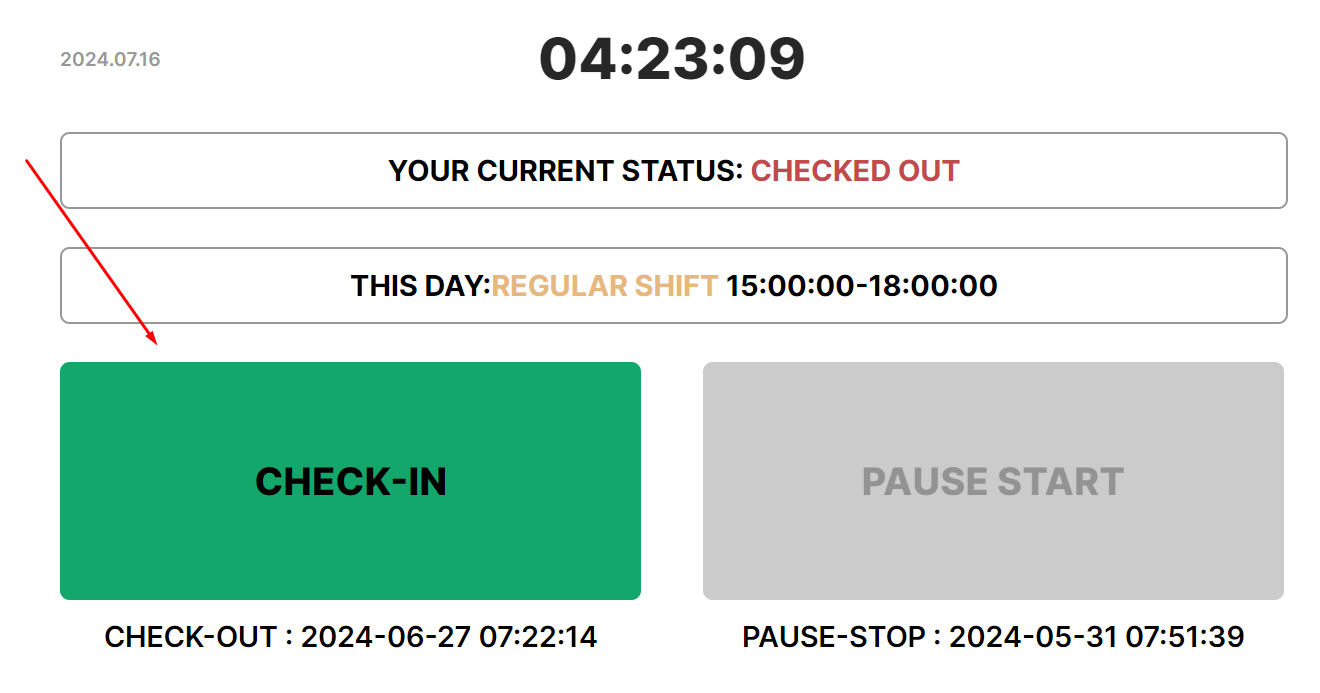
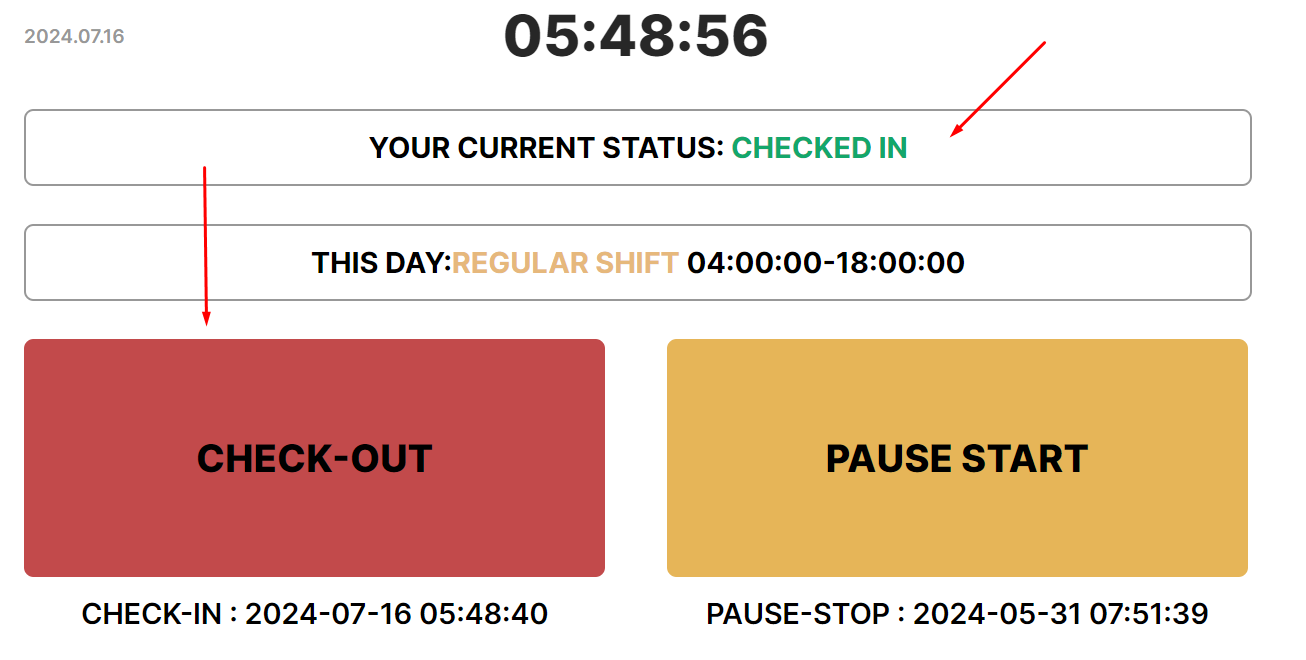
<p id="bkmrk-perform-check-in-to-" dir="ltr" style="line-height: 1.3800000000000001; margin-top: 16pt; margin-bottom: 4pt;"><span style="font-size: 12pt; font-family: Arial,sans-serif; color: #000000; background-color: transparent; font-weight: 400; font-style: normal; font-variant: normal; text-decoration: none; vertical-align: baseline; white-space: pre-wrap;">Perform check-in to mark the beginning of the working day</span>

[![](https://usrman.a-tracker.net/uploads/images/gallery/2024-07/scaled-1680-/image-1721118306754.png)](https://usrman.a-tracker.net/uploads/images/gallery/2024-07/image-1721118306754.png)
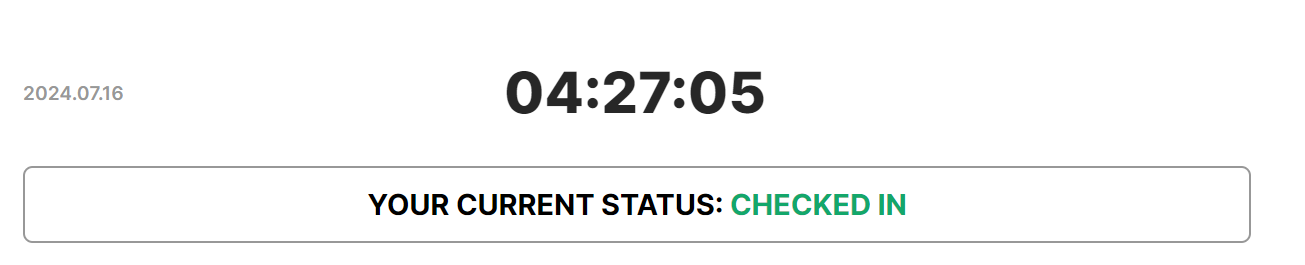
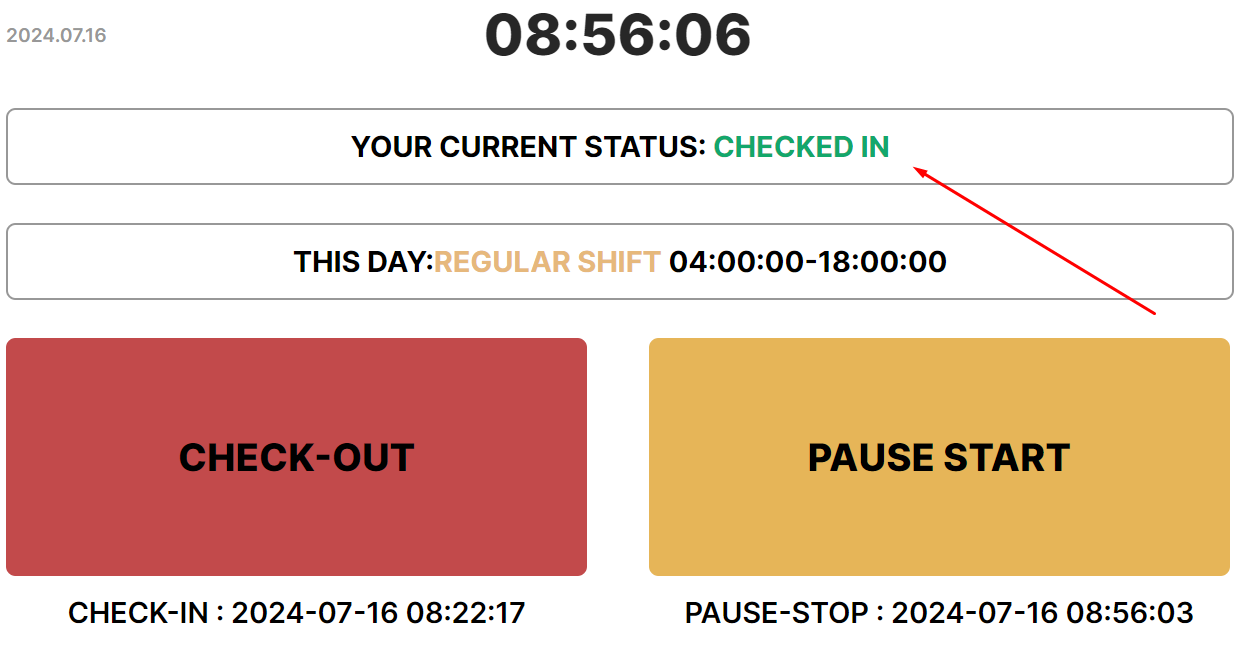
<p id="bkmrk---the-status-will-ch" dir="ltr" style="line-height: 1.3800000000000001; margin-top: 0pt; margin-bottom: 0pt;" role="presentation"><span style="font-size: 12pt; font-family: Arial,sans-serif; color: #000000; background-color: transparent; font-weight: 400; font-style: normal; font-variant: normal; text-decoration: none; vertical-align: baseline; white-space: pre-wrap;">- The status will change to “Checked in”.</span></p>

[![](https://usrman.a-tracker.net/uploads/images/gallery/2024-07/scaled-1680-/image-1721118461010.png)](https://usrman.a-tracker.net/uploads/images/gallery/2024-07/image-1721118461010.png)

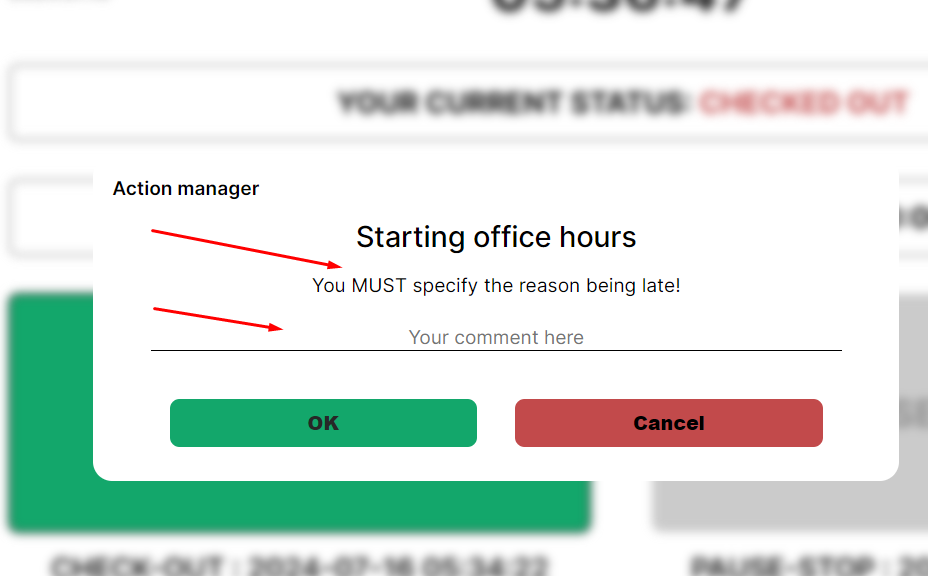
<p id="bkmrk---if-the-system-reco" dir="ltr" style="line-height: 1.3800000000000001; margin-top: 0pt; margin-bottom: 0pt;" role="presentation"><span style="font-size: 12pt; font-family: Arial,sans-serif; color: #000000; background-color: transparent; font-weight: 400; font-style: normal; font-variant: normal; text-decoration: none; vertical-align: baseline; white-space: pre-wrap;">- If the system records being late (checking in after the start of the working day according to the schedule specified in the profile), it will ask for the reason for the delay — a comment. </span><span style="font-size: 12pt; font-family: Arial,sans-serif; color: #000000; background-color: transparent; font-weight: 400; font-style: normal; font-variant: normal; text-decoration: none; vertical-align: baseline; white-space: pre-wrap;">Enter a comment in the input field and press "Ok". </span><span style="font-size: 12pt; font-family: Arial,sans-serif; color: #000000; background-color: transparent; font-weight: 400; font-style: normal; font-variant: normal; text-decoration: none; vertical-align: baseline; white-space: pre-wrap;">If You won't fill Commentary input and press “Cancel”, </span><span style="font-size: 12pt; font-family: Arial,sans-serif; color: #000000; background-color: transparent; font-weight: bold; font-style: italic; font-variant: normal; text-decoration: none; vertical-align: baseline; white-space: pre-wrap;">Check-in won't be recorded to the system</span><span style="font-size: 12pt; font-family: Arial,sans-serif; color: #000000; background-color: transparent; font-weight: 400; font-style: italic; font-variant: normal; text-decoration: none; vertical-align: baseline; white-space: pre-wrap;">.</span></p>

[![](https://usrman.a-tracker.net/uploads/images/gallery/2024-07/scaled-1680-/image-1721122766560.png)](https://usrman.a-tracker.net/uploads/images/gallery/2024-07/image-1721122766560.png)

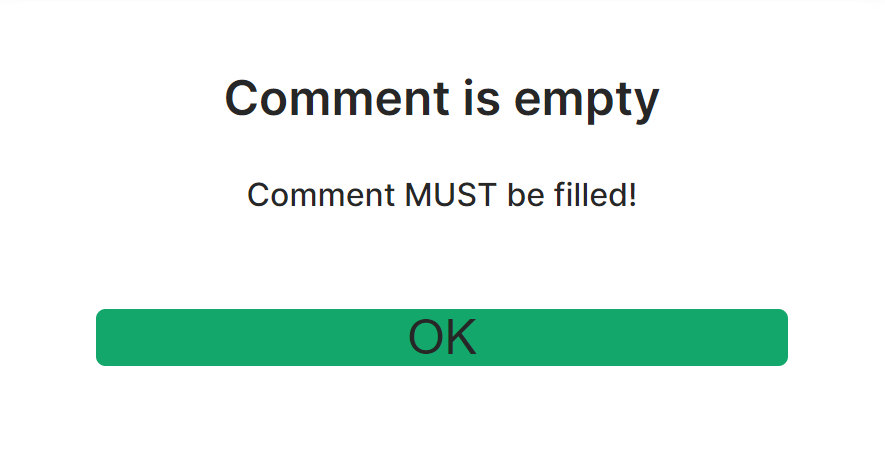
<p id="bkmrk---if-you-click-%22ok%22-" dir="ltr" style="line-height: 1.3800000000000001; margin-top: 0pt; margin-bottom: 0pt;" role="presentation"><span style="font-size: 12pt; font-family: Arial,sans-serif; color: #000000; background-color: transparent; font-weight: 400; font-style: normal; font-variant: normal; text-decoration: none; vertical-align: baseline; white-space: pre-wrap;">- If you click "Ok" when the comment is not entered (while you are late), the system will show a notification to fill in the comment.</span></p>
<p id="bkmrk---in-the-comment-fie" dir="ltr" style="line-height: 1.3800000000000001; margin-top: 0pt; margin-bottom: 0pt;" role="presentation"><span style="font-size: 12pt; font-family: Arial,sans-serif; color: #000000; background-color: transparent; font-weight: 400; font-style: normal; font-variant: normal; text-decoration: none; vertical-align: baseline; white-space: pre-wrap;">- In the comment field, you should briefly enter a specific and truthful reason for the lateness, and this information will be submitted to the manager.</span></p>
<p id="bkmrk--9"><span style="font-weight: normal;"><br></span></p>

[![](https://usrman.a-tracker.net/uploads/images/gallery/2024-07/scaled-1680-/image-1721123096379.png)](https://usrman.a-tracker.net/uploads/images/gallery/2024-07/image-1721123096379.png)

# Marking the end of the work day

<p id="bkmrk-perform-check-out-to" dir="ltr" style="line-height: 1.3800000000000001; margin-top: 16pt; margin-bottom: 4pt;"><span style="font-size: 12pt; font-family: Arial,sans-serif; color: #000000; background-color: transparent; font-weight: 400; font-style: normal; font-variant: normal; text-decoration: none; vertical-align: baseline; white-space: pre-wrap;">Perform check-out to mark the end of the working day</span></p>
<p id="bkmrk-"><strong id="bkmrk--1" style="font-weight: normal;"><br></strong></p>

[![](https://usrman.a-tracker.net/uploads/images/gallery/2024-07/scaled-1680-/image-1721123438111.png)](https://usrman.a-tracker.net/uploads/images/gallery/2024-07/image-1721123438111.png)

<p id="bkmrk--3"><strong style="font-weight: normal;"><br></strong></p>
<p id="bkmrk---the-status-will-ch" dir="ltr" style="line-height: 1.3800000000000001; margin-top: 0pt; margin-bottom: 0pt;" role="presentation"><span style="font-size: 12pt; font-family: Arial,sans-serif; color: #000000; background-color: transparent; font-weight: 400; font-style: normal; font-variant: normal; text-decoration: none; vertical-align: baseline; white-space: pre-wrap;">- The status will change to “Checked out”.</span></p>
<p id="bkmrk--4"><strong style="font-weight: normal;"><br></strong></p>

[![](https://usrman.a-tracker.net/uploads/images/gallery/2024-07/scaled-1680-/image-1721123582960.png)](https://usrman.a-tracker.net/uploads/images/gallery/2024-07/image-1721123582960.png)

<p id="bkmrk--6"><strong style="font-weight: normal;"><br></strong></p>
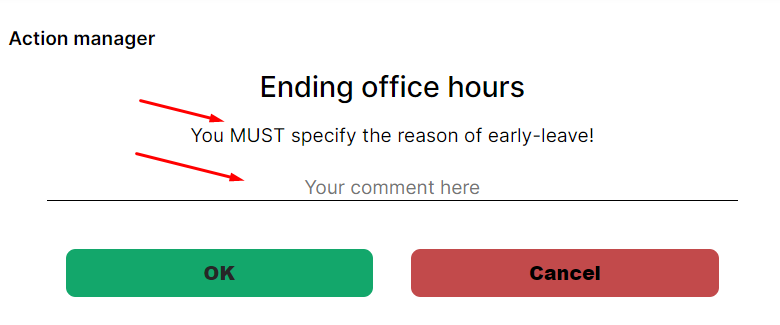
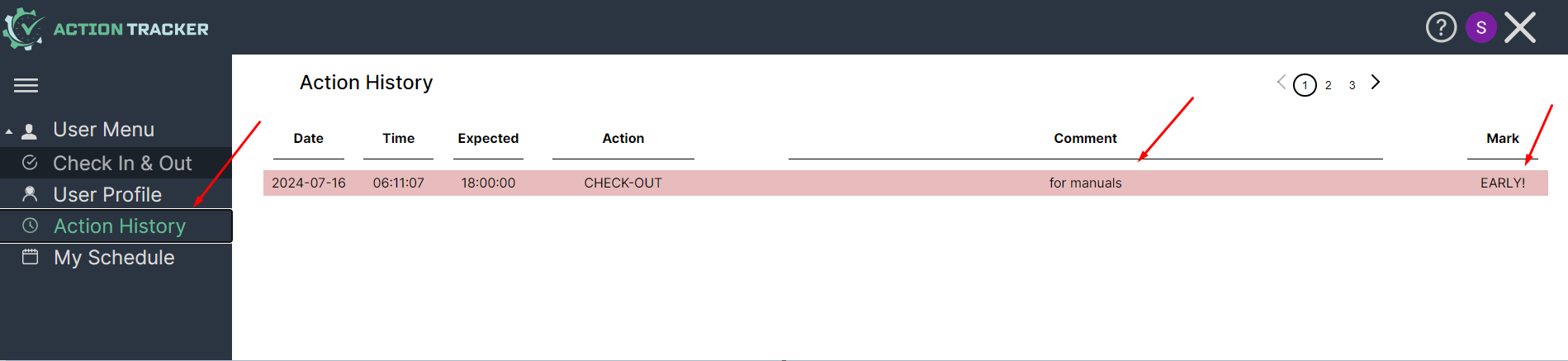
<p id="bkmrk---if-check-out-is-pe" dir="ltr" style="line-height: 1.3800000000000001; margin-top: 0pt; margin-bottom: 0pt;" role="presentation"><span style="font-size: 12pt; font-family: Arial,sans-serif; color: #000000; background-color: transparent; font-weight: 400; font-style: normal; font-variant: normal; text-decoration: none; vertical-align: baseline; white-space: pre-wrap;">- If check-out is performed before the end of the working day specified in the schedule, the system will record early leave and request a comment. </span><span style="font-size: 12pt; font-family: Arial,sans-serif; color: #000000; background-color: transparent; font-weight: 400; font-style: normal; font-variant: normal; text-decoration: none; vertical-align: baseline; white-space: pre-wrap;">You need to enter a comment and press “Оk”.</span></p>
<p id="bkmrk--7"><strong style="font-weight: normal;"><br></strong></p>


[![](https://usrman.a-tracker.net/uploads/images/gallery/2024-07/scaled-1680-/image-1721124182168.png)](https://usrman.a-tracker.net/uploads/images/gallery/2024-07/image-1721124182168.png)

<p id="bkmrk--9"><strong style="font-weight: normal;"><br></strong></p>
<p id="bkmrk---the-status-will-ch-1" dir="ltr" style="line-height: 1.3800000000000001; margin-top: 0pt; margin-bottom: 0pt;" role="presentation"><span style="font-size: 12pt; font-family: Arial,sans-serif; color: #000000; background-color: transparent; font-weight: 400; font-style: normal; font-variant: normal; text-decoration: none; vertical-align: baseline; white-space: pre-wrap;">- The status will change to “Checked out”, and an early leave mark will be added to Action History.</span></p>
<p id="bkmrk--10"><strong style="font-weight: normal;"><br></strong></p>

[![](https://usrman.a-tracker.net/uploads/images/gallery/2024-07/scaled-1680-/image-1721123582960.png)](https://usrman.a-tracker.net/uploads/images/gallery/2024-07/image-1721123582960.png)

[![](https://usrman.a-tracker.net/uploads/images/gallery/2024-07/scaled-1680-/image-1721124869075.png)](https://usrman.a-tracker.net/uploads/images/gallery/2024-07/image-1721124869075.png)

<p id="bkmrk--12"><strong style="font-weight: normal;"><br></strong></p>
<p id="bkmrk---if-you-do-not-ente" dir="ltr" style="line-height: 1.3800000000000001; margin-top: 0pt; margin-bottom: 0pt;" role="presentation"><span style="font-size: 12pt; font-family: Arial,sans-serif; color: #000000; background-color: transparent; font-weight: 400; font-style: normal; font-variant: normal; text-decoration: none; vertical-align: baseline; white-space: pre-wrap;">- If you do not enter a comment, the system will show a notification of its necessity.</span></p>
<p id="bkmrk---if-you-click-%E2%80%9Ccanc" dir="ltr" style="line-height: 1.3800000000000001; margin-top: 0pt; margin-bottom: 0pt;" role="presentation"><span style="font-size: 12pt; font-family: Arial,sans-serif; color: #000000; background-color: transparent; font-weight: 400; font-style: italic; font-variant: normal; text-decoration: none; vertical-align: baseline; white-space: pre-wrap;">- If you click “Cancel”, </span><span style="font-size: 12pt; font-family: Arial,sans-serif; color: #000000; background-color: transparent; font-weight: bold; font-style: italic; font-variant: normal; text-decoration: none; vertical-align: baseline; white-space: pre-wrap;">check-out will not be executed</span><span style="font-size: 12pt; font-family: Arial,sans-serif; color: #000000; background-color: transparent; font-weight: 400; font-style: italic; font-variant: normal; text-decoration: none; vertical-align: baseline; white-space: pre-wrap;">.</span></p>
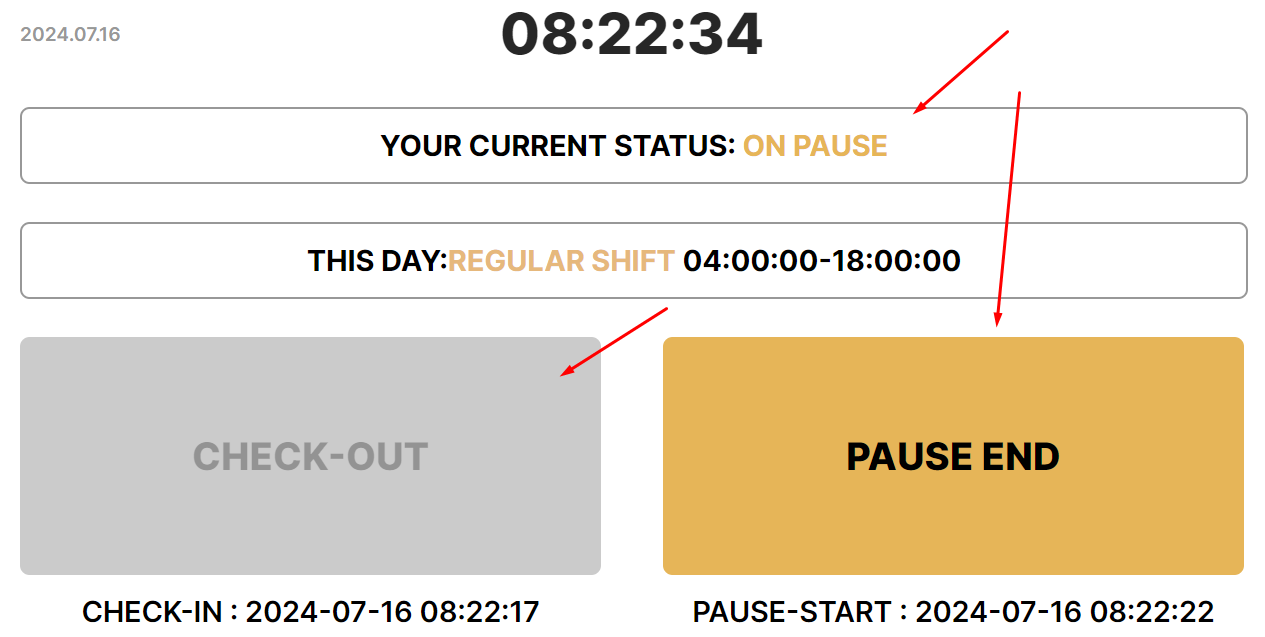
<p id="bkmrk---if-you-are-%E2%80%9Con-pau" dir="ltr" style="line-height: 1.3800000000000001; margin-top: 0pt; margin-bottom: 0pt;" role="presentation"><span style="font-size: 12pt; font-family: Arial,sans-serif; color: #000000; background-color: transparent; font-weight: 400; font-style: normal; font-variant: normal; text-decoration: none; vertical-align: baseline; white-space: pre-wrap;">- If you are “On pause” or have not performed a check in, the “check out” button will not be available. </span></p>
<p id="bkmrk--13"><strong style="font-weight: normal;"><br></strong></p>

[![](https://usrman.a-tracker.net/uploads/images/gallery/2024-07/scaled-1680-/image-1721132702036.png)](https://usrman.a-tracker.net/uploads/images/gallery/2024-07/image-1721132702036.png)

<p dir="ltr" style="line-height: 1.3800000000000001; margin-top: 0pt; margin-bottom: 0pt;" role="presentation" id="bkmrk-%C2%A0">&nbsp;</p>
<p id="bkmrk---you-need-to-un-pau" dir="ltr" style="line-height: 1.3800000000000001; margin-top: 0pt; margin-bottom: 0pt;" role="presentation"><span style="font-size: 12pt; font-family: Arial,sans-serif; color: #000000; background-color: transparent; font-weight: 400; font-style: normal; font-variant: normal; text-decoration: none; vertical-align: baseline; white-space: pre-wrap;">- You need to un-pause </span></p>
<p dir="ltr" style="line-height: 1.3800000000000001; margin-top: 0pt; margin-bottom: 0pt;" role="presentation" id="bkmrk-%C2%A0-1">&nbsp;</p>

[![](https://usrman.a-tracker.net/uploads/images/gallery/2024-07/scaled-1680-/image-1721132849249.png)](https://usrman.a-tracker.net/uploads/images/gallery/2024-07/image-1721132849249.png)

# Marking the beginning of the break during work time

<p dir="ltr" style="line-height: 1.3800000000000001; margin-top: 16pt; margin-bottom: 4pt;" id="bkmrk-%C2%A0">&nbsp;</p>
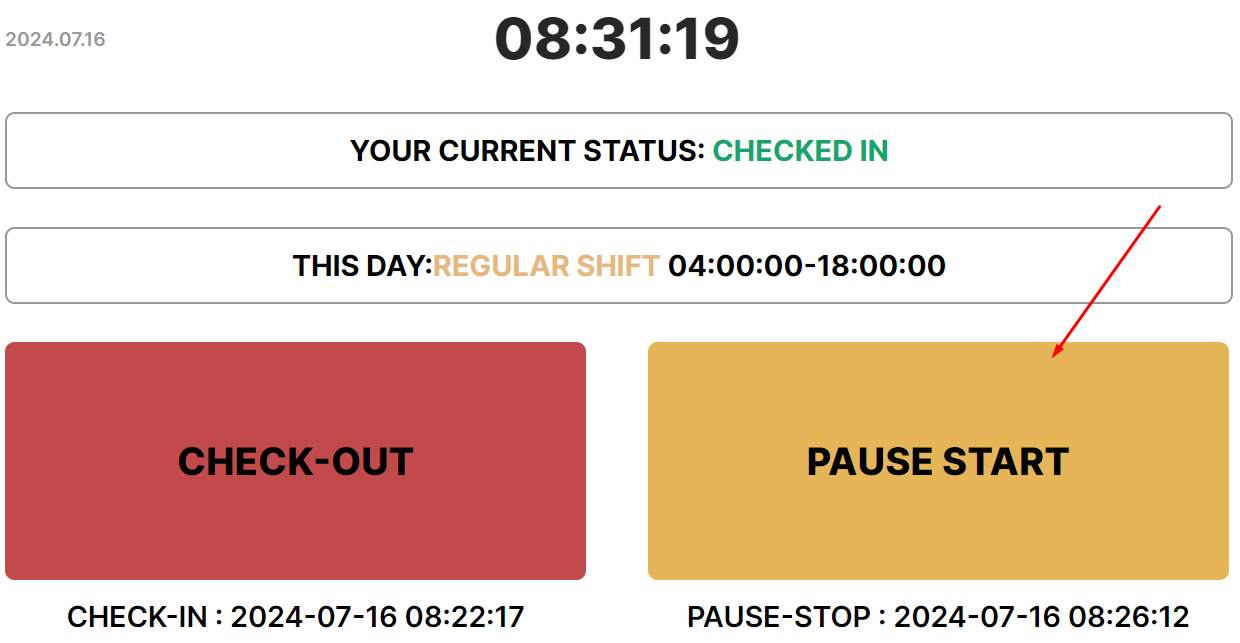
<p id="bkmrk-press-%E2%80%9Cpause-start%E2%80%9D-" dir="ltr" style="line-height: 1.3800000000000001; margin-top: 16pt; margin-bottom: 4pt;"><span style="font-size: 12pt; font-family: Arial,sans-serif; color: #000000; background-color: transparent; font-weight: 400; font-style: normal; font-variant: normal; text-decoration: none; vertical-align: baseline; white-space: pre-wrap;">Press “Pause start” to mark a lunch break or a pause in work</span></p>
<p id="bkmrk-"><strong id="bkmrk--1" style="font-weight: normal;"><br></strong></p>
<p id="bkmrk---you-can-only-start" dir="ltr" style="line-height: 1.3800000000000001; margin-top: 0pt; margin-bottom: 0pt;" role="presentation"><span style="font-size: 12pt; font-family: Arial,sans-serif; color: #000000; background-color: transparent; font-weight: 400; font-style: normal; font-variant: normal; text-decoration: none; vertical-align: baseline; white-space: pre-wrap;">- You can only start a break after performing Check-in when the “Pause start” button becomes active.</span></p>
<p id="bkmrk--2"><strong style="font-weight: normal;"><br></strong></p>

[![](https://usrman.a-tracker.net/uploads/images/gallery/2024-07/scaled-1680-/image-1721133177382.png)](https://usrman.a-tracker.net/uploads/images/gallery/2024-07/image-1721133177382.png)

<p id="bkmrk--4"><strong style="font-weight: normal;"><br></strong></p>
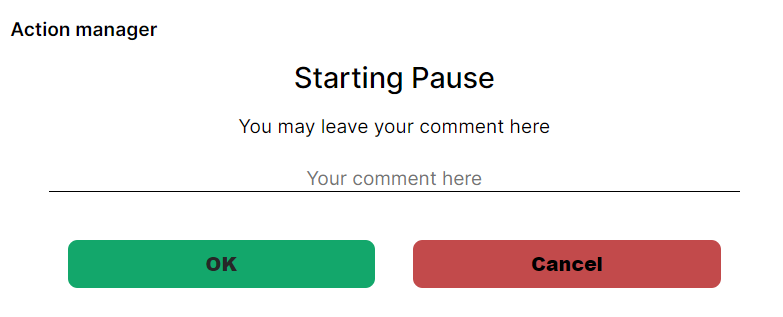
<p id="bkmrk---enter-a-comment-if" dir="ltr" style="line-height: 1.3800000000000001; margin-top: 0pt; margin-bottom: 0pt;" role="presentation"><span style="font-size: 12pt; font-family: Arial,sans-serif; color: #000000; background-color: transparent; font-weight: 400; font-style: normal; font-variant: normal; text-decoration: none; vertical-align: baseline; white-space: pre-wrap;">- Enter a comment if you wish or leave the field blank and press “Ok”.</span></p>
<p id="bkmrk--5"><strong style="font-weight: normal;"><br></strong></p>

[![](https://usrman.a-tracker.net/uploads/images/gallery/2024-07/scaled-1680-/image-1721133323797.png)](https://usrman.a-tracker.net/uploads/images/gallery/2024-07/image-1721133323797.png)

<p id="bkmrk--7"><strong style="font-weight: normal;"><br></strong></p>
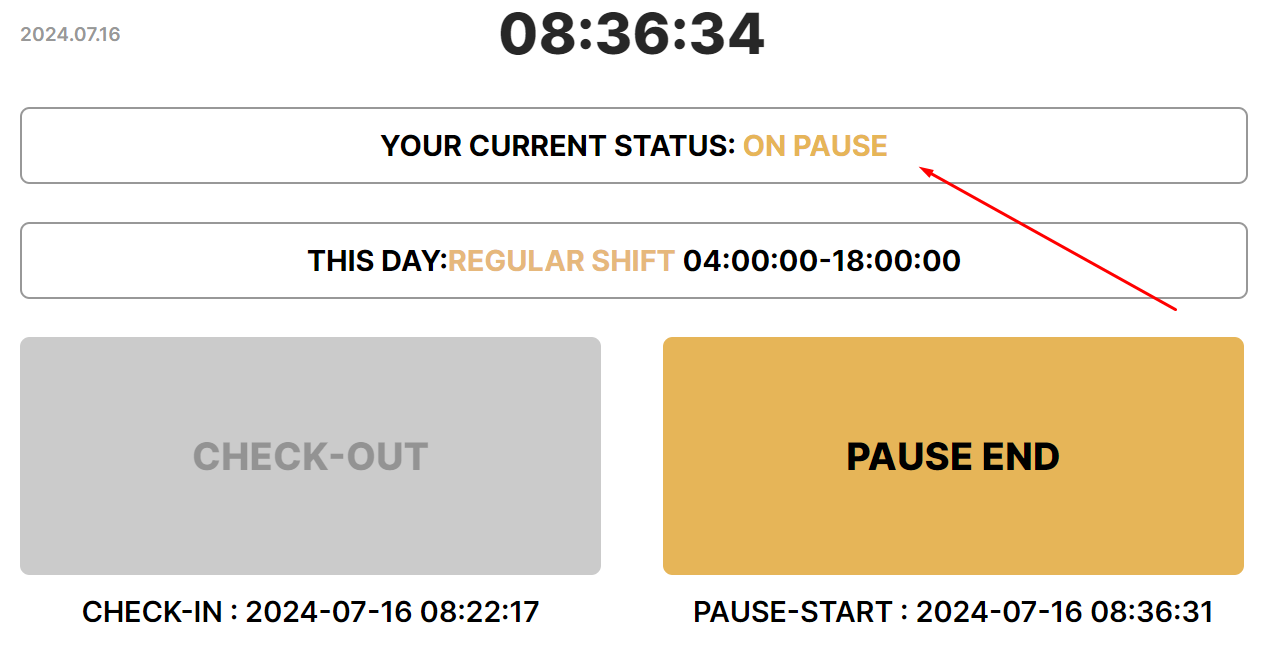
<p id="bkmrk---the-status-will-ch" dir="ltr" style="line-height: 1.3800000000000001; margin-top: 0pt; margin-bottom: 0pt;" role="presentation"><span style="font-size: 12pt; font-family: Arial,sans-serif; color: #000000; background-color: transparent; font-weight: 400; font-style: normal; font-variant: normal; text-decoration: none; vertical-align: baseline; white-space: pre-wrap;">- The status will change to “On pause”.</span></p>
<p id="bkmrk--8"><span style="font-weight: normal;"><br></span></p>

[![](https://usrman.a-tracker.net/uploads/images/gallery/2024-07/scaled-1680-/image-1721133476838.png)](https://usrman.a-tracker.net/uploads/images/gallery/2024-07/image-1721133476838.png)

# Marking the end of break during work time

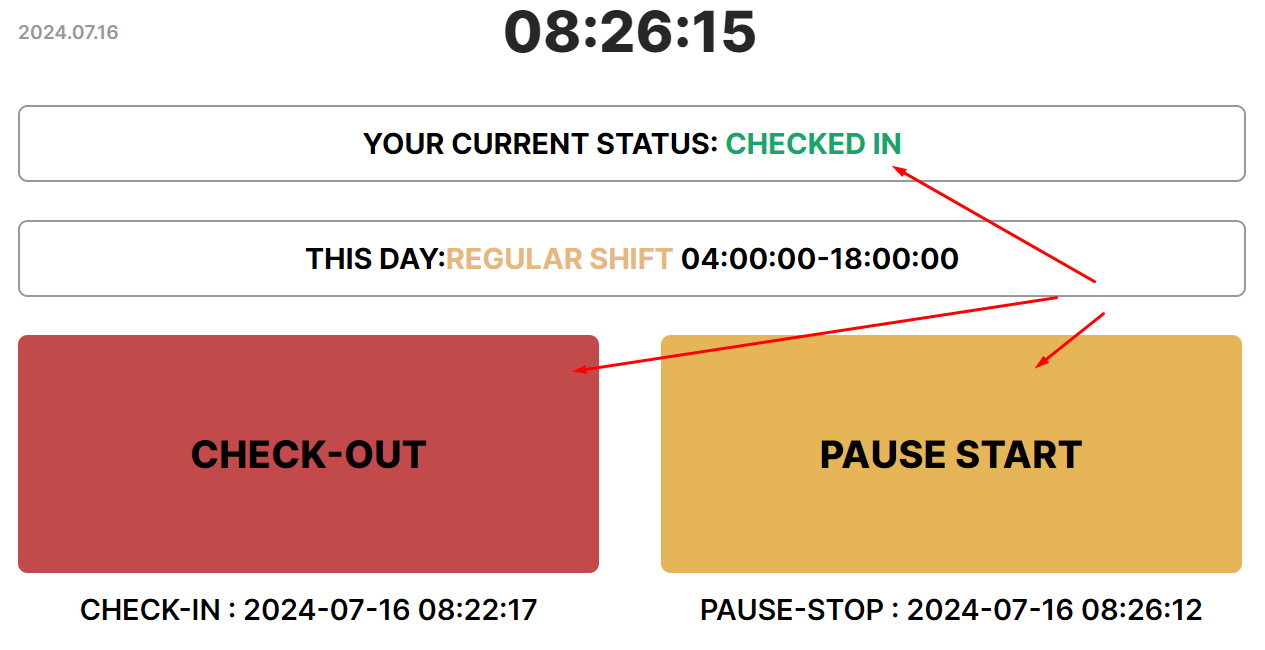
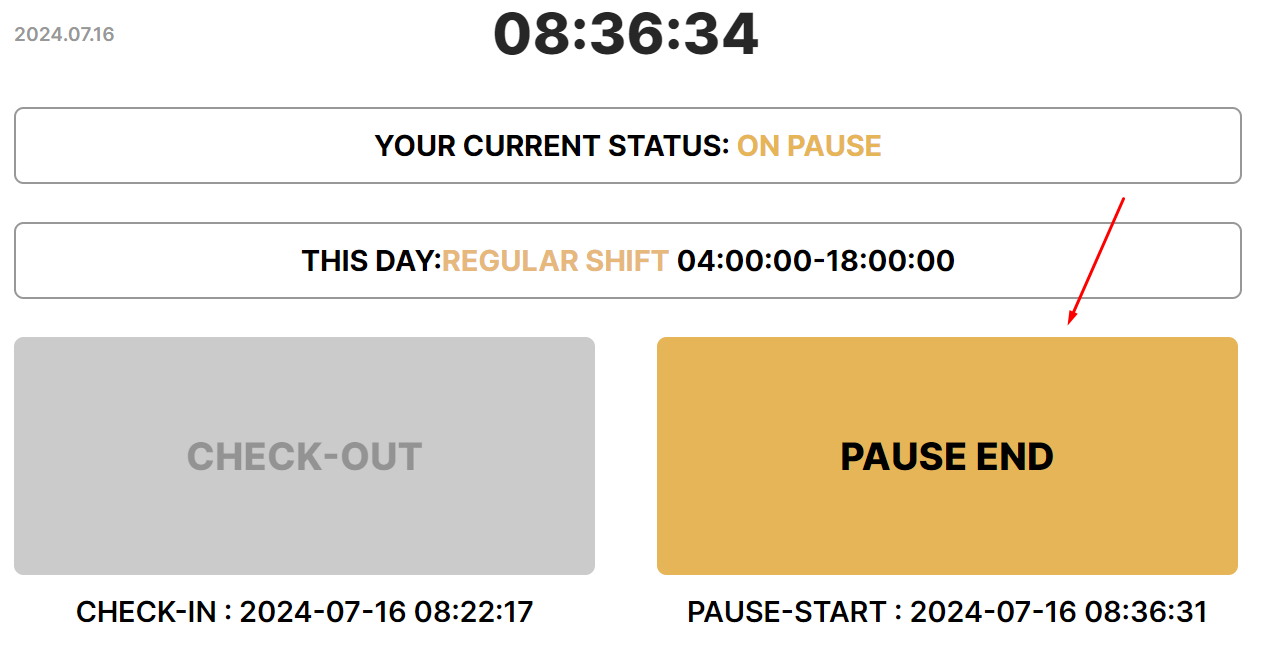
<p dir="ltr" style="line-height: 1.3800000000000001; margin-top: 16pt; margin-bottom: 4pt;" id="bkmrk-press-the-%E2%80%9Cpause-sto"><span style="font-size: 12pt; font-family: Arial,sans-serif; color: #000000; background-color: transparent; font-weight: 400; font-style: normal; font-variant: normal; text-decoration: none; vertical-align: baseline; white-space: pre-wrap;">Press the “Pause stop” button to mark the end of a pause</span></p>
<p dir="ltr" style="line-height: 1.3800000000000001; margin-top: 0pt; margin-bottom: 0pt;" role="presentation" id="bkmrk---the-button-will-be"><span style="font-size: 12pt; font-family: Arial,sans-serif; color: #000000; background-color: transparent; font-weight: 400; font-style: normal; font-variant: normal; text-decoration: none; vertical-align: baseline; white-space: pre-wrap;">- The button will become active only after activation of the pause.</span></p>
<p id="bkmrk-"><strong id="bkmrk--1" style="font-weight: normal;"><br></strong></p>

[![](https://usrman.a-tracker.net/uploads/images/gallery/2024-07/scaled-1680-/image-1721134469037.png)](https://usrman.a-tracker.net/uploads/images/gallery/2024-07/image-1721134469037.png)

<p id="bkmrk--3"><strong style="font-weight: normal;"><br></strong></p>
<p dir="ltr" style="line-height: 1.3800000000000001; margin-top: 0pt; margin-bottom: 0pt;" role="presentation" id="bkmrk---enter-a-comment-or"><span style="font-size: 12pt; font-family: Arial,sans-serif; color: #000000; background-color: transparent; font-weight: 400; font-style: normal; font-variant: normal; text-decoration: none; vertical-align: baseline; white-space: pre-wrap;">- Enter a comment or leave the field blank and press “Ok”.</span></p>
<p dir="ltr" style="line-height: 1.3800000000000001; margin-top: 0pt; margin-bottom: 0pt;" role="presentation" id="bkmrk---the-status-will-ch"><span style="font-size: 12pt; font-family: Arial,sans-serif; color: #000000; background-color: transparent; font-weight: 400; font-style: normal; font-variant: normal; text-decoration: none; vertical-align: baseline; white-space: pre-wrap;">- The status will change to Checked in. </span></p>
<p id="bkmrk--4"><span style="font-weight: normal;"><br></span></p>

[![](https://usrman.a-tracker.net/uploads/images/gallery/2024-07/scaled-1680-/image-1721134637785.png)](https://usrman.a-tracker.net/uploads/images/gallery/2024-07/image-1721134637785.png)

# User profile

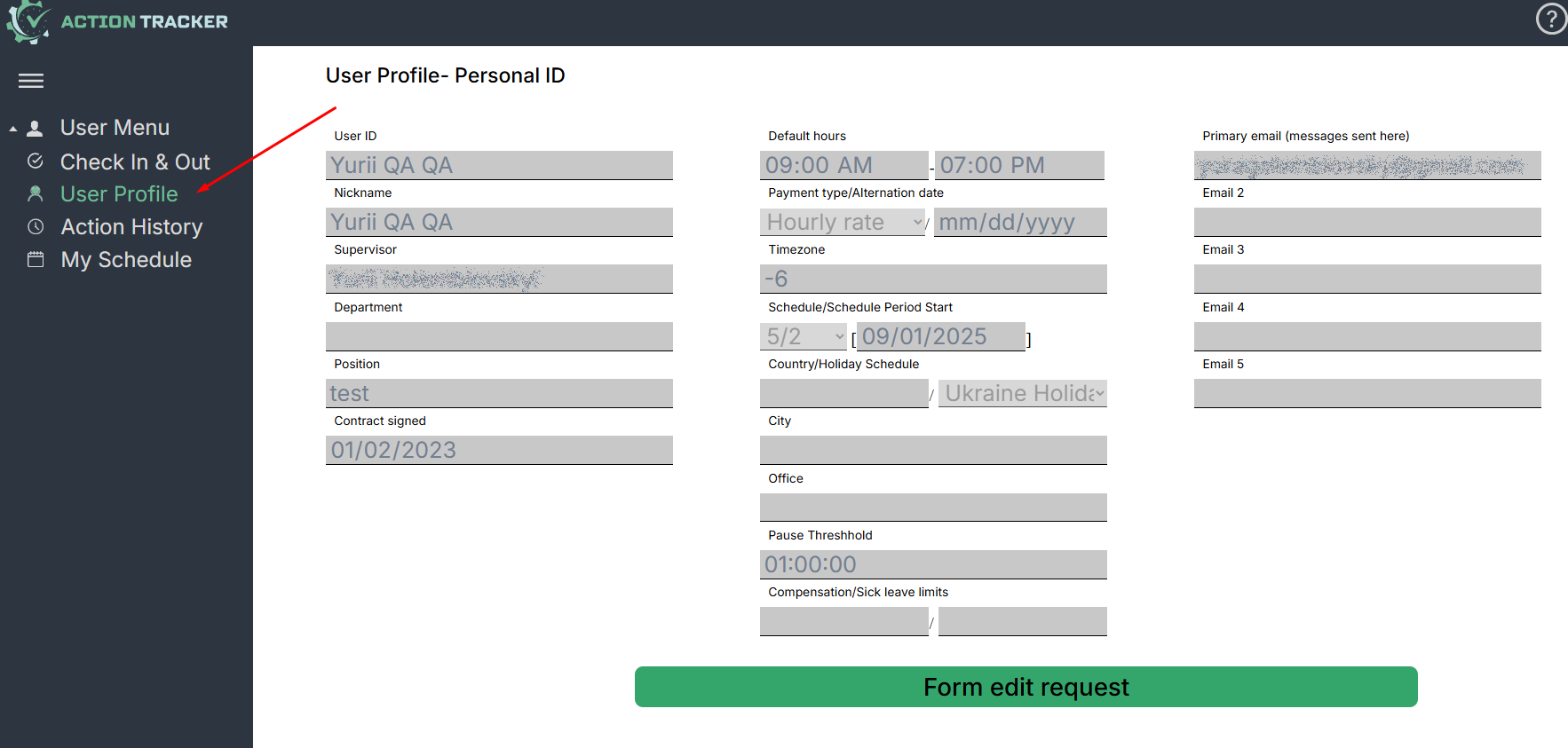
<span style="font-size: 12pt; font-family: Arial,sans-serif; color: #000000; background-color: transparent; font-weight: 400; font-style: normal; font-variant: normal; text-decoration: none; vertical-align: baseline; white-space: pre-wrap;">The "User Profile" section lists the main user data.</span>

<span style="font-size: 12pt; font-family: Arial,sans-serif; color: #000000; background-color: transparent; font-weight: bold; font-style: normal; font-variant: normal; text-decoration: none; vertical-align: baseline; white-space: pre-wrap;">The user of the Action Tracker system is responsible for the correctness of the information in this section</span><span style="font-size: 12pt; font-family: Arial,sans-serif; color: #000000; background-color: transparent; font-weight: 400; font-style: normal; font-variant: normal; text-decoration: none; vertical-align: baseline; white-space: pre-wrap;">.</span>

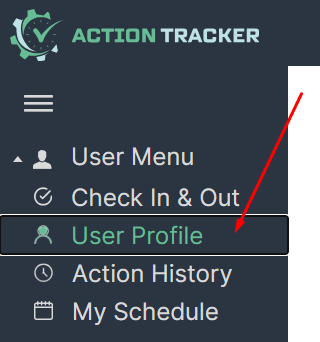
<span style="font-size: 12pt; font-family: Arial,sans-serif; color: #000000; background-color: transparent; font-weight: 400; font-style: normal; font-variant: normal; text-decoration: none; vertical-align: baseline; white-space: pre-wrap;">- To navigate to the "User Profile" section, press the corresponding button in the menu on the left.</span>

<span style="font-size: 12pt; font-family: Arial,sans-serif; color: #000000; background-color: transparent; font-weight: 400; font-style: normal; font-variant: normal; text-decoration: none; vertical-align: baseline; white-space: pre-wrap;">- The user data window will open.</span>

<span style="font-size: 12pt; font-family: Arial,sans-serif; color: #000000; background-color: transparent; font-weight: 400; font-style: normal; font-variant: normal; text-decoration: none; vertical-align: baseline; white-space: pre-wrap;">- Please contact support if you need to make any changes: </span>[<span style="font-size: 12pt; font-family: Arial,sans-serif; color: #1155cc; background-color: transparent; font-weight: 400; font-style: normal; font-variant: normal; text-decoration: underline; -webkit-text-decoration-skip: none; text-decoration-skip-ink: none; vertical-align: baseline; white-space: pre-wrap;">support.team@a-tracker.net</span>](mailto:support.team@a-tracker.net)<span style="font-size: 12pt; font-family: Arial,sans-serif; color: #000000; background-color: transparent; font-weight: 400; font-style: normal; font-variant: normal; text-decoration: none; vertical-align: baseline; white-space: pre-wrap;">.</span>

[![](https://usrman.a-tracker.net/uploads/images/gallery/2024-07/scaled-1680-/image-1721134959031.png)](https://usrman.a-tracker.net/uploads/images/gallery/2024-07/image-1721134959031.png)

<span style="font-size: 16pt; font-family: Arial,sans-serif; color: #000000; background-color: transparent; font-weight: 400; font-style: normal; font-variant: normal; text-decoration: none; vertical-align: baseline; white-space: pre-wrap;">User profile interface</span>

[![](https://usrman.a-tracker.net/uploads/images/gallery/2025-09/scaled-1680-/image-1757686497999.png)](https://usrman.a-tracker.net/uploads/images/gallery/2025-09/image-1757686497999.png)

<span style="font-size: 12pt; font-family: Arial,sans-serif; color: #000000; background-color: transparent; font-weight: 400; font-style: normal; font-variant: normal; text-decoration: none; vertical-align: baseline; white-space: pre-wrap;">- <span style="font-size: 12pt; font-family: Arial,sans-serif; color: #000000; background-color: transparent; font-weight: 400; font-style: normal; font-variant: normal; text-decoration: none; vertical-align: baseline; white-space: pre-wrap;">Username &amp; Nickname - user’s personal information</span></span>

<span style="font-size: 12pt; font-family: Arial,sans-serif; color: #000000; background-color: transparent; font-weight: 400; font-style: normal; font-variant: normal; text-decoration: none; vertical-align: baseline; white-space: pre-wrap;">- <span style="font-size: 12pt; font-family: Arial,sans-serif; color: #000000; background-color: transparent; font-weight: 400; font-style: normal; font-variant: normal; text-decoration: none; vertical-align: baseline; white-space: pre-wrap;">Supervisor - your direct supervisor</span> </span>

<span style="font-size: 12pt; font-family: Arial,sans-serif; color: #000000; background-color: transparent; font-weight: 400; font-style: normal; font-variant: normal; text-decoration: none; vertical-align: baseline; white-space: pre-wrap;">- <span style="font-size: 12pt; font-family: Arial,sans-serif; color: #000000; background-color: transparent; font-weight: 400; font-style: normal; font-variant: normal; text-decoration: none; vertical-align: baseline; white-space: pre-wrap;">Schedule - work time schedule applicable to you</span></span>

<span style="font-size: 12pt; font-family: Arial,sans-serif; color: #000000; background-color: transparent; font-weight: 400; font-style: normal; font-variant: normal; text-decoration: none; vertical-align: baseline; white-space: pre-wrap;">- <span style="font-size: 12pt; font-family: Arial,sans-serif; color: #000000; background-color: transparent; font-weight: 400; font-style: normal; font-variant: normal; text-decoration: none; vertical-align: baseline; white-space: pre-wrap;">Timezone - your timezone, should be same as your business timezone</span></span>

<span style="font-size: 12pt; font-family: Arial,sans-serif; color: #000000; background-color: transparent; font-weight: 400; font-style: normal; font-variant: normal; text-decoration: none; vertical-align: baseline; white-space: pre-wrap;">- <span style="font-size: 12pt; font-family: Arial,sans-serif; color: #000000; background-color: transparent; font-weight: 400; font-style: normal; font-variant: normal; text-decoration: none; vertical-align: baseline; white-space: pre-wrap;">Country, City, Office - user’s physical location</span> </span>

<span style="font-size: 12pt; font-family: Arial,sans-serif; color: #000000; background-color: transparent; font-weight: 400; font-style: normal; font-variant: normal; text-decoration: none; vertical-align: baseline; white-space: pre-wrap;">- <span style="font-size: 12pt; font-family: Arial,sans-serif; color: #000000; background-color: transparent; font-weight: 400; font-style: normal; font-variant: normal; text-decoration: none; vertical-align: baseline; white-space: pre-wrap;">Emails - list of you corporate email addresses</span></span>

<span style="font-size: 12pt; font-family: Arial,sans-serif; color: #000000; background-color: transparent; font-weight: 400; font-style: normal; font-variant: normal; text-decoration: none; vertical-align: baseline; white-space: pre-wrap;"><span style="font-size: 12pt; font-family: Arial,sans-serif; color: #000000; background-color: transparent; font-weight: 400; font-style: normal; font-variant: normal; text-decoration: none; vertical-align: baseline; white-space: pre-wrap;">- <span style="font-size: 12pt; font-family: Ari<p>al,sans-serif; color: #000000; background-color: transparent; font-weight: 400; font-style: normal; font-variant: normal; text-decoration: none; vertical-align: baseline; white-space: pre-wrap;"><span style="font-size: 12pt; font-family: Arial,sans-serif; color: #000000; background-color: transparent; font-weight: 400; font-style: normal; font-variant: normal; text-decoration: none; vertical-align: baseline; white-space: pre-wrap;">Position - your position within department</span></span></span></span>

<span style="font-size: 12pt; font-family: Arial,sans-serif; color: #000000; background-color: transparent; font-weight: 400; font-style: normal; font-variant: normal; text-decoration: none; vertical-align: baseline; white-space: pre-wrap;"><span style="font-size: 12pt; font-family: Arial,sans-serif; color: #000000; background-color: transparent; font-weight: 400; font-style: normal; font-variant: normal; text-decoration: none; vertical-align: baseline; white-space: pre-wrap;"><span style="font-size: 12pt; font-family: Ari<p>al,sans-serif; color: #000000; background-color: transparent; font-weight: 400; font-style: normal; font-variant: normal; text-decoration: none; vertical-align: baseline; white-space: pre-wrap;"><span style="font-size: 12pt; font-family: Arial,sans-serif; color: #000000; background-color: transparent; font-weight: 400; font-style: normal; font-variant: normal; text-decoration: none; vertical-align: baseline; white-space: pre-wrap;">- <span style="font-size: 12pt; font-family: Arial,sans-serif; color: #000000; background-color: transparent; font-weight: 400; font-style: normal; font-variant: normal; text-decoration: none; vertical-align: baseline; white-space: pre-wrap;">Contract signed - date you have your contract signed</span></span></span></span></span>

## <span style="font-size: 16pt; font-family: Arial,sans-serif; color: #000000; background-color: transparent; font-weight: 400; font-style: normal; font-variant: normal; text-decoration: none; vertical-align: baseline; white-space: pre-wrap;">Request data correction </span>

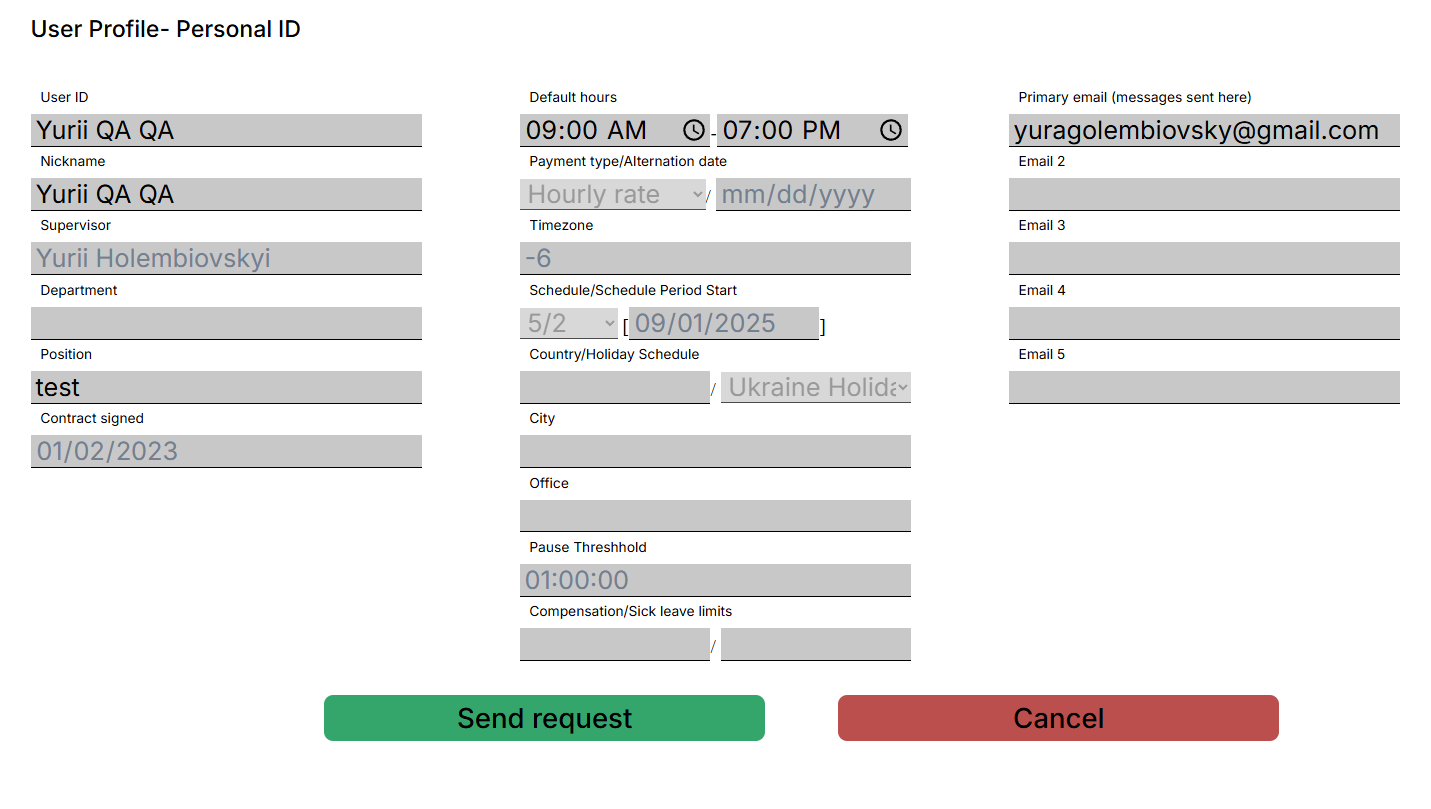
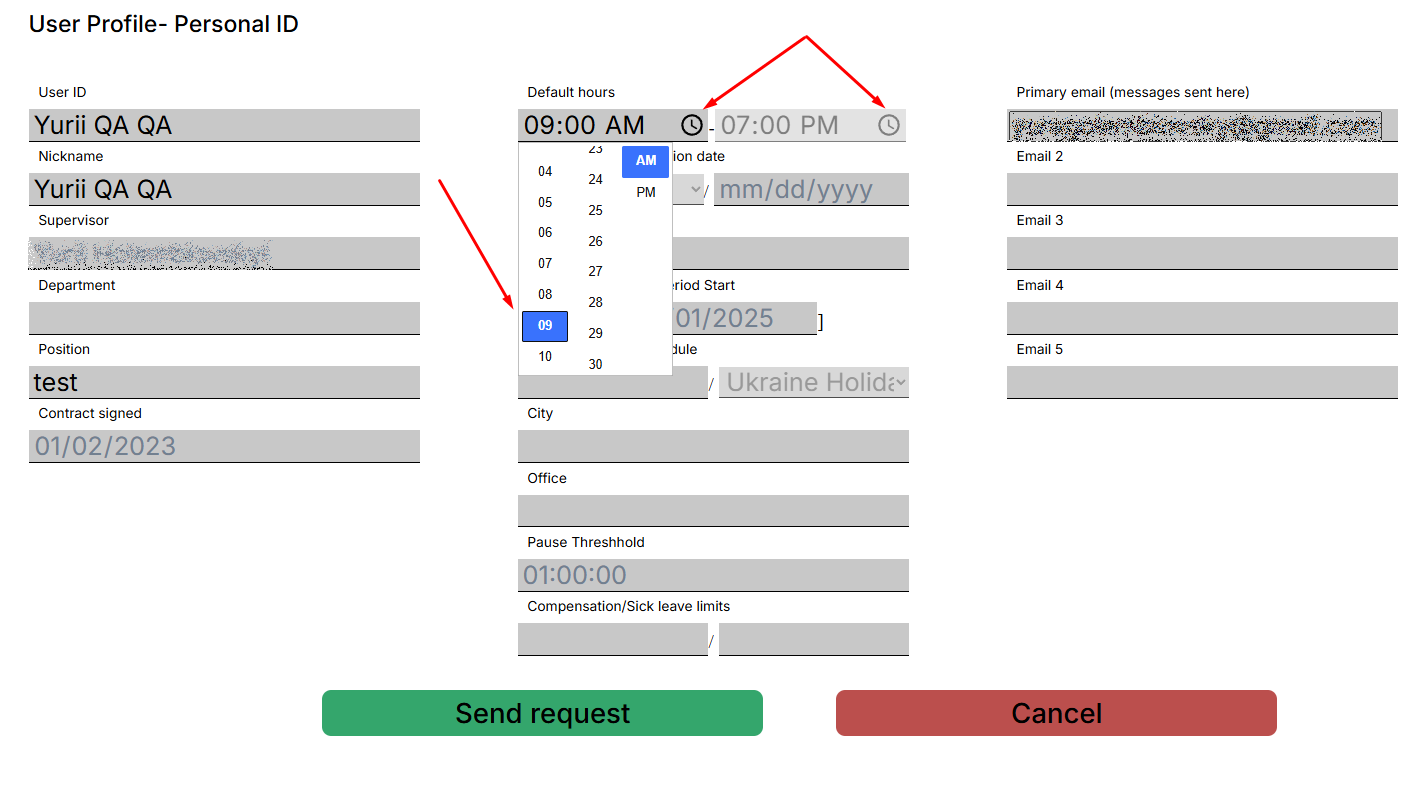
<span style="font-size: 12pt; font-family: Arial,sans-serif; color: #000000; background-color: transparent; font-weight: 400; font-style: normal; font-variant: normal; text-decoration: none; vertical-align: baseline; white-space: pre-wrap;">Users can send data correction requests while in the “Profile” tab if any inaccuracies have been noticed or to record any recent changes in personal or corporate data.</span>

<span style="font-size: 12pt; font-family: Arial,sans-serif; color: #000000; background-color: transparent; font-weight: 400; font-style: normal; font-variant: normal; text-decoration: none; vertical-align: baseline; white-space: pre-wrap;">To send a request to the support team you need to press the “Request data correction” button first. You will see that fields have changed text color representing fields available to be changed. You are free to change any data necessary and then press the “Send request” button to finish editing. Support team will receive request via email as well as you and your supervisor. </span><span style="font-size: 12pt; font-family: Arial,sans-serif; color: #000000; background-color: transparent; font-weight: bold; font-style: normal; font-variant: normal; text-decoration: none; vertical-align: baseline; white-space: pre-wrap;">Changes won’t be displayed until the support team or your supervisor approves and record requested changes to the database.</span>

<span style="font-size: 12pt; font-family: Arial,sans-serif; color: #000000; background-color: transparent; font-weight: 400; font-style: italic; font-variant: normal; text-decoration: none; vertical-align: baseline; white-space: pre-wrap;">Example is in the screenshot below</span>

[![](https://usrman.a-tracker.net/uploads/images/gallery/2025-09/scaled-1680-/image-1757686691753.png)](https://usrman.a-tracker.net/uploads/images/gallery/2025-09/image-1757686691753.png)

<span style="font-size: 12pt; font-family: Arial,sans-serif; color: #000000; background-color: transparent; font-weight: 400; font-style: normal; font-variant: normal; text-decoration: none; vertical-align: baseline; white-space: pre-wrap;">List of all the field available for editing:</span>

<span style="font-size: 12pt; font-family: Arial,sans-serif; color: #000000; background-color: transparent; font-weight: 400; font-style: normal; font-variant: normal; text-decoration: none; vertical-align: baseline; white-space: pre-wrap;">- Username та Nickname</span>

<span style="font-size: 12pt; font-family: Arial,sans-serif; color: #000000; background-color: transparent; font-weight: 400; font-style: normal; font-variant: normal; text-decoration: none; vertical-align: baseline; white-space: pre-wrap;">- Schedule </span>

<span style="font-size: 12pt; font-family: Arial,sans-serif; color: #000000; background-color: transparent; font-weight: 400; font-style: normal; font-variant: normal; text-decoration: none; vertical-align: baseline; white-space: pre-wrap;">- Country, City, Office</span>

<span style="font-size: 12pt; font-family: Arial,sans-serif; color: #000000; background-color: transparent; font-weight: 400; font-style: normal; font-variant: normal; text-decoration: none; vertical-align: baseline; white-space: pre-wrap;">- Emails</span>

<span style="font-size: 12pt; font-family: Arial,sans-serif; color: #000000; background-color: transparent; font-weight: 400; font-style: normal; font-variant: normal; text-decoration: none; vertical-align: baseline; white-space: pre-wrap;">- Department, Position </span>

<span style="font-size: 12pt; font-family: Arial,sans-serif; color: #000000; background-color: transparent; font-weight: 400; font-style: normal; font-variant: normal; text-decoration: none; vertical-align: baseline; white-space: pre-wrap;">Fields that will not be able for editing:</span>

<span style="font-size: 12pt; font-family: Arial,sans-serif; color: #000000; background-color: transparent; font-weight: 400; font-style: normal; font-variant: normal; text-decoration: none; vertical-align: baseline; white-space: pre-wrap;">- Supervisor</span>

<span style="font-size: 12pt; font-family: Arial,sans-serif; color: #000000; background-color: transparent; font-weight: 400; font-style: normal; font-variant: normal; text-decoration: none; vertical-align: baseline; white-space: pre-wrap;">- Timezone</span>

<span style="font-size: 12pt; font-family: Arial,sans-serif; color: #000000; background-color: transparent; font-weight: 400; font-style: normal; font-variant: normal; text-decoration: none; vertical-align: baseline; white-space: pre-wrap;">- Contract signed</span>

<span style="font-size: 12pt; font-family: Arial,sans-serif; color: #000000; background-color: transparent; font-weight: 400; font-style: normal; font-variant: normal; text-decoration: none; vertical-align: baseline; white-space: pre-wrap;">To edit a data field you need to point the cursor over the input field or select text you want to edit and perform typing new data.</span>

<span style="font-size: 12pt; font-family: Arial,sans-serif; color: #000000; background-color: transparent; font-weight: 400; font-style: normal; font-variant: normal; text-decoration: none; vertical-align: baseline; white-space: pre-wrap;">To change “Schedule” fields simply click on the clock ico and select the correct time.</span>

<span style="font-size: 12pt; font-family: Arial,sans-serif; color: #000000; background-color: transparent; font-weight: bold; font-style: normal; font-variant: normal; text-decoration: none; vertical-align: baseline; white-space: pre-wrap;">(Won’t work in firefox browsers as this feature is not supported by browser)</span>

[![](https://usrman.a-tracker.net/uploads/images/gallery/2025-09/scaled-1680-/image-1757686793518.png)](https://usrman.a-tracker.net/uploads/images/gallery/2025-09/image-1757686793518.png)

<span style="font-size: 12pt; font-family: Arial,sans-serif; color: #000000; background-color: transparent; font-weight: 400; font-style: italic; font-variant: normal; text-decoration: none; vertical-align: baseline; white-space: pre-wrap;">If correction must be applied to the fields that are not available to edit please address </span>[<span style="font-size: 12pt; font-family: Arial,sans-serif; color: #1155cc; background-color: transparent; font-weight: 400; font-style: italic; font-variant: normal; text-decoration: underline; -webkit-text-decoration-skip: none; text-decoration-skip-ink: none; vertical-align: baseline; white-space: pre-wrap;">support.team@a-tracker.net</span>](mailto:support.team@a-tracker.net)<span style="font-size: 12pt; font-family: Arial,sans-serif; color: #000000; background-color: transparent; font-weight: 400; font-style: italic; font-variant: normal; text-decoration: none; vertical-align: baseline; white-space: pre-wrap;"> support team and your supervisor in copy.</span>

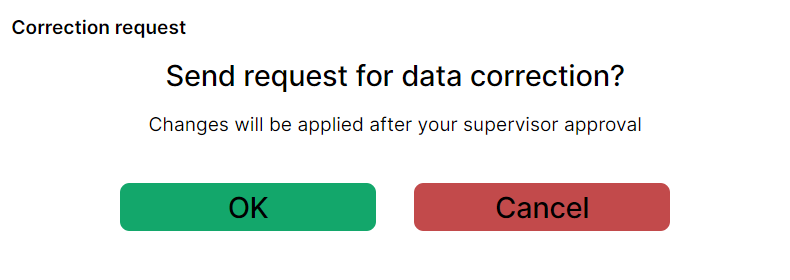
<span style="font-size: 12pt; font-family: Arial,sans-serif; color: #000000; background-color: transparent; font-weight: 400; font-style: normal; font-variant: normal; text-decoration: none; vertical-align: baseline; white-space: pre-wrap;">After all editing is finished press “Send request” button. System will question you to make sure you entered the correct data, as shown on screenshot below.</span>

[![](https://usrman.a-tracker.net/uploads/images/gallery/2024-07/scaled-1680-/image-1721136212001.png)](https://usrman.a-tracker.net/uploads/images/gallery/2024-07/image-1721136212001.png)

<span style="font-size: 12pt; font-family: Arial,sans-serif; color: #000000; background-color: transparent; font-weight: 400; font-style: normal; font-variant: normal; text-decoration: none; vertical-align: baseline; white-space: pre-wrap;">As the user presses the “OK” button, email will be sent to your supervisor, support team and a copy of email to the user.</span>

<span style="font-size: 12pt; font-family: Arial,sans-serif; color: #000000; background-color: transparent; font-weight: 400; font-style: normal; font-variant: normal; text-decoration: none; vertical-align: baseline; white-space: pre-wrap;">After supervisor approval has been received by the support team, changes will be made to the user's record in the database.</span>

[![](https://usrman.a-tracker.net/uploads/images/gallery/2024-08/scaled-1680-/image-1722846126112.png)](https://usrman.a-tracker.net/uploads/images/gallery/2024-08/image-1722846126112.png)

<span id="bkmrk--6" style="font-weight: normal;"> </span><span style="font-size: 12pt; font-family: Arial,sans-serif; color: #000000; background-color: transparent; font-weight: 400; font-style: normal; font-variant: normal; text-decoration: none; vertical-align: baseline; white-space: pre-wrap;">After a request has been sent, the user will see the “Profile” page again. IMPORTANT: page will show old data until recent changes have been approved and applied.</span>

# Action History

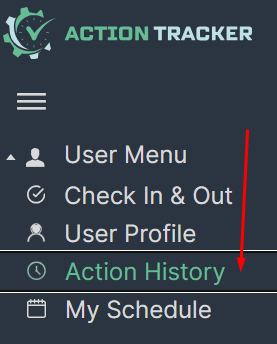
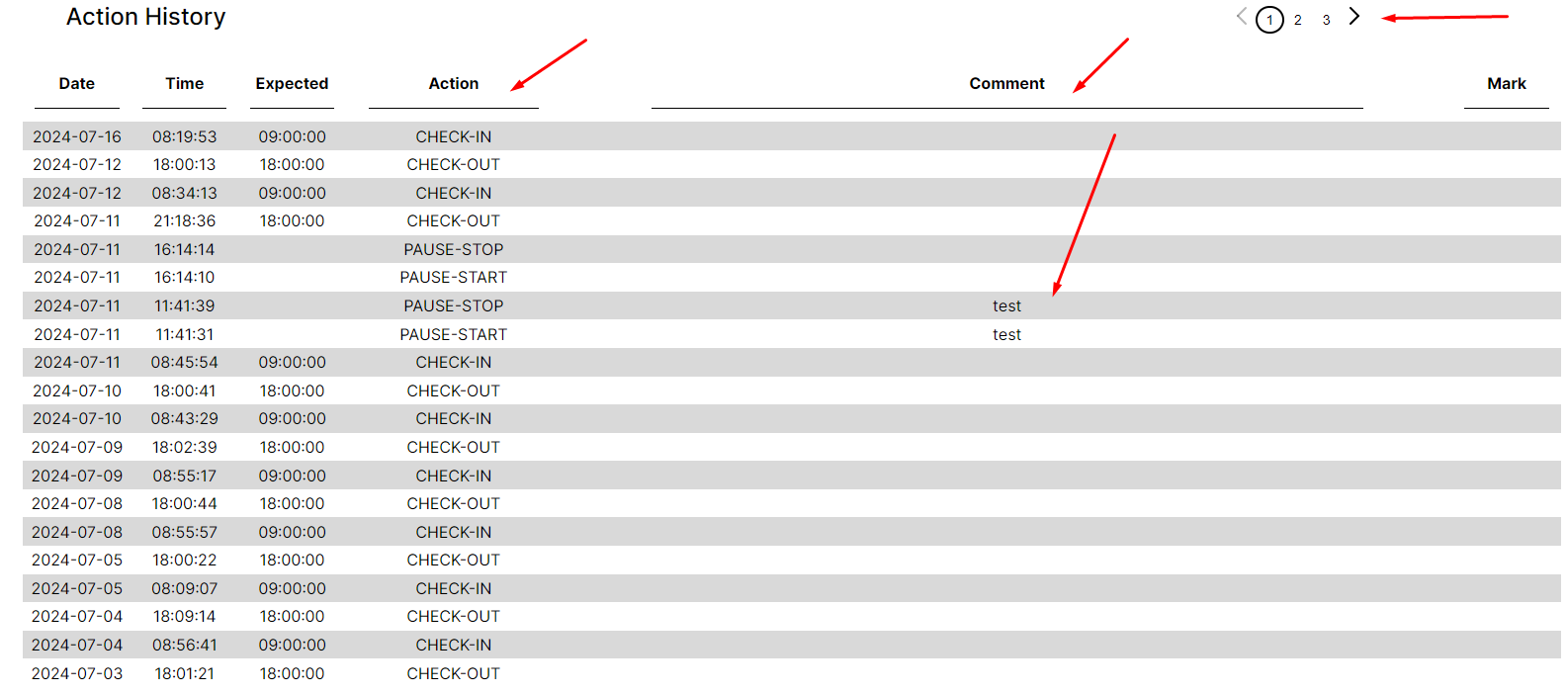
<span style="font-size: 12pt; font-family: Arial,sans-serif; color: #000000; background-color: transparent; font-weight: 400; font-style: normal; font-variant: normal; text-decoration: none; vertical-align: baseline; white-space: pre-wrap;">In this section, you can view your history of check-in, check-out, pause start, and pause stop</span>

<span style="font-size: 12pt; font-family: Arial,sans-serif; color: #000000; background-color: transparent; font-weight: 400; font-style: normal; font-variant: normal; text-decoration: none; vertical-align: baseline; white-space: pre-wrap;">- To navigate to the "Action History" section, press the corresponding </span><span style="font-size: 12pt; font-family: Arial,sans-serif; color: #000000; background-color: transparent; font-weight: 400; font-style: normal; font-variant: normal; text-decoration: none; vertical-align: baseline; white-space: pre-wrap;">button in the menu on the left.</span>

<span style="font-size: 12pt; font-family: Arial,sans-serif; color: #000000; background-color: transparent; font-weight: 400; font-style: normal; font-variant: normal; text-decoration: none; vertical-align: baseline; white-space: pre-wrap;">- This section shows the history of performed check-in, check-out, pause start, </span><span style="font-size: 12pt; font-family: Arial,sans-serif; color: #000000; background-color: transparent; font-weight: 400; font-style: normal; font-variant: normal; text-decoration: none; vertical-align: baseline; white-space: pre-wrap;">and pause stop actions with recorded time and comments.</span>

[![](https://usrman.a-tracker.net/uploads/images/gallery/2024-07/scaled-1680-/image-1721137178121.png)](https://usrman.a-tracker.net/uploads/images/gallery/2024-07/image-1721137178121.png)

[![](https://usrman.a-tracker.net/uploads/images/gallery/2024-07/scaled-1680-/image-1721137384139.png)](https://usrman.a-tracker.net/uploads/images/gallery/2024-07/image-1721137384139.png)
# My Schedule


# Overview

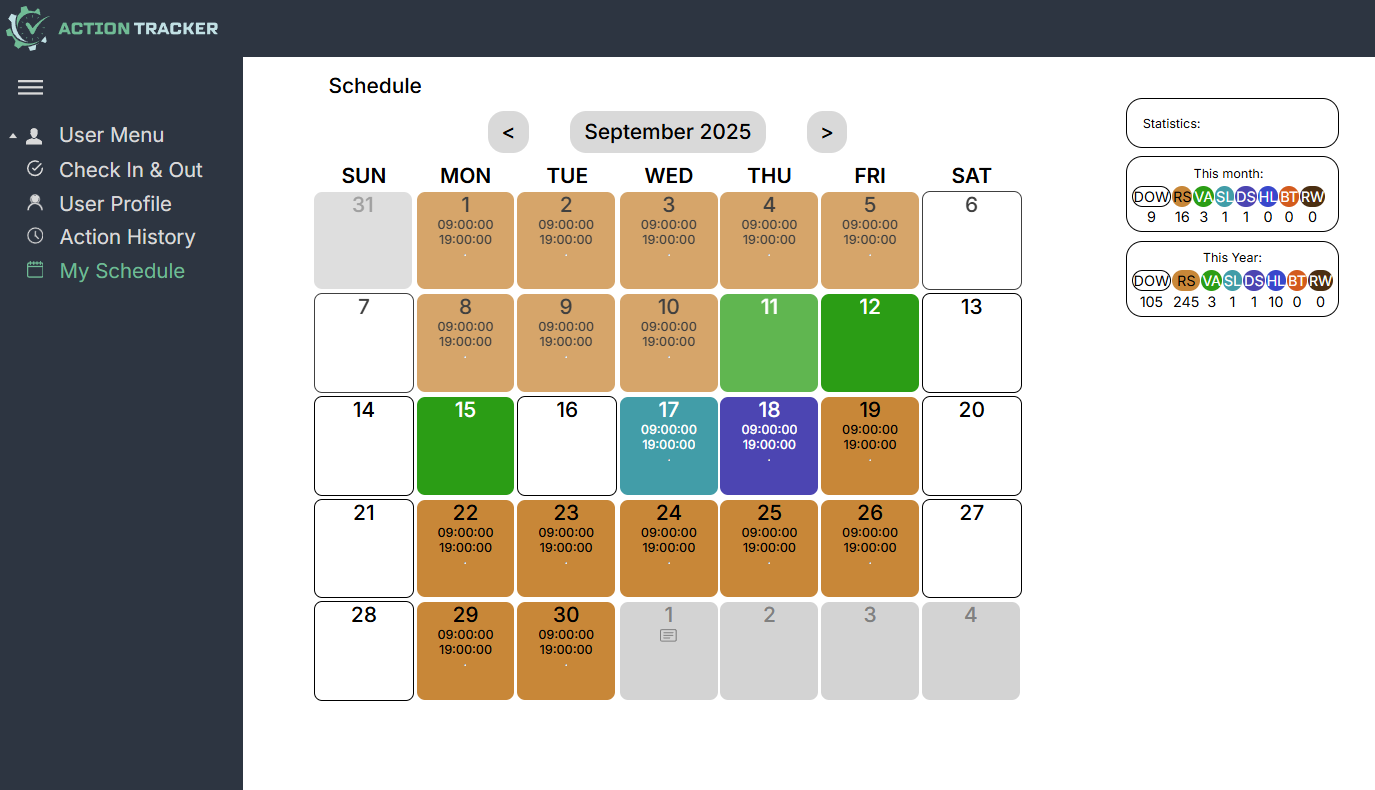
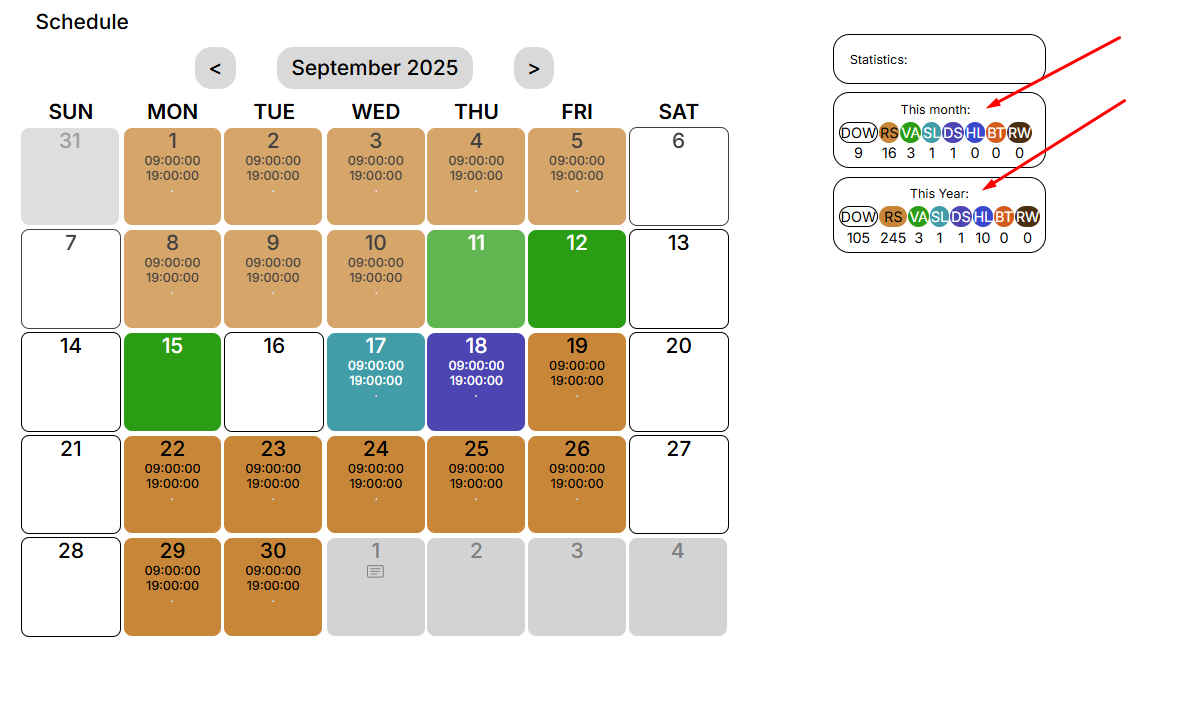
<span style="font-size: 12pt; font-family: Arial,sans-serif; color: #000000; background-color: transparent; font-weight: 400; font-style: normal; font-variant: normal; text-decoration: none; vertical-align: baseline; white-space: pre-wrap;">My Schedule section is intended to plan your schedule for the near future and gives you the opportunity to</span>

<span style="font-size: 12pt; font-family: Arial,sans-serif; color: #000000; background-color: transparent; font-weight: 400; font-style: normal; font-variant: normal; text-decoration: none; vertical-align: baseline; white-space: pre-wrap;">- mark days off (if your schedule differs from the standard),</span>

<span style="font-size: 12pt; font-family: Arial,sans-serif; color: #000000; background-color: transparent; font-weight: 400; font-style: normal; font-variant: normal; text-decoration: none; vertical-align: baseline; white-space: pre-wrap;">- mark regular shifts,</span>

<span style="font-size: 12pt; font-family: Arial,sans-serif; color: #000000; background-color: transparent; font-weight: 400; font-style: normal; font-variant: normal; text-decoration: none; vertical-align: baseline; white-space: pre-wrap;">- mark healthcare time,</span>

<span style="font-size: 12pt; font-family: Arial,sans-serif; color: #000000; background-color: transparent; font-weight: 400; font-style: normal; font-variant: normal; text-decoration: none; vertical-align: baseline; white-space: pre-wrap;">- plan vacations,</span>

<span style="font-size: 12pt; font-family: Arial,sans-serif; color: #000000; background-color: transparent; font-weight: 400; font-style: normal; font-variant: normal; text-decoration: none; vertical-align: baseline; white-space: pre-wrap;">- mark duty shifts,</span>

<span style="font-size: 12pt; font-family: Arial,sans-serif; color: #000000; background-color: transparent; font-weight: 400; font-style: normal; font-variant: normal; text-decoration: none; vertical-align: baseline; white-space: pre-wrap;">- mark specific schedules,</span>

<span style="font-size: 12pt; font-family: Arial,sans-serif; color: #000000; background-color: transparent; font-weight: 400; font-style: normal; font-variant: normal; text-decoration: none; vertical-align: baseline; white-space: pre-wrap;">- leave comments.</span>

[![](https://usrman.a-tracker.net/uploads/images/gallery/2025-09/scaled-1680-/image-1757687157880.png)](https://usrman.a-tracker.net/uploads/images/gallery/2025-09/image-1757687157880.png)

<span style="font-size: 12pt; font-family: Arial,sans-serif; color: #000000; background-color: transparent; font-weight: 400; font-style: normal; font-variant: normal; text-decoration: none; vertical-align: baseline; white-space: pre-wrap;">On the right are the monthly and annual statistics.</span>

[![](https://usrman.a-tracker.net/uploads/images/gallery/2025-09/scaled-1680-/image-1757687193345.png)](https://usrman.a-tracker.net/uploads/images/gallery/2025-09/image-1757687193345.png)

# Planning your schedule

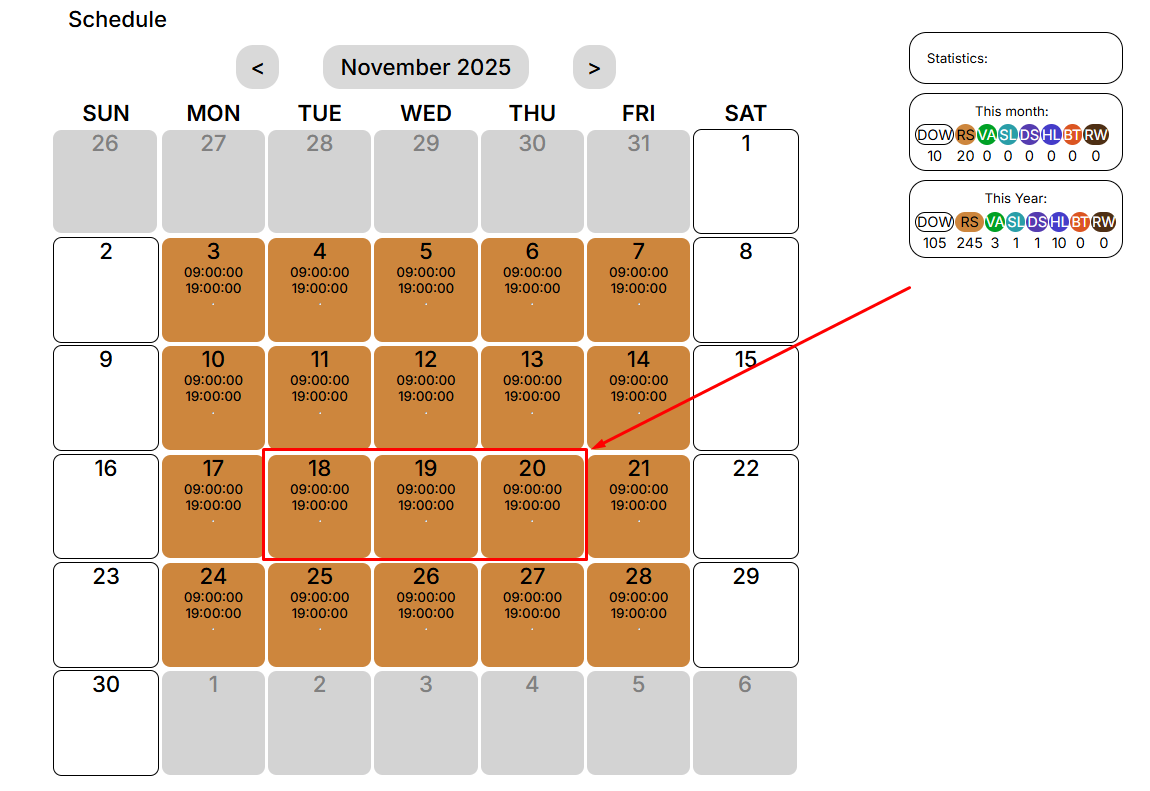
<span style="font-size: 12pt; font-family: Arial,sans-serif; color: #000000; background-color: transparent; font-weight: 400; font-style: normal; font-variant: normal; text-decoration: none; vertical-align: baseline; white-space: pre-wrap;">By choosing the type of days you want to schedule, you can specify the desired dates for the selected event. </span>

<span style="font-size: 12pt; font-family: Arial,sans-serif; color: #000000; background-color: transparent; font-weight: 400; font-style: normal; font-variant: normal; text-decoration: none; vertical-align: baseline; white-space: pre-wrap;">To do this, you need to select the day (or days) that interest you:</span>

[![](https://usrman.a-tracker.net/uploads/images/gallery/2025-09/scaled-1680-/image-1757687347535.png)](https://usrman.a-tracker.net/uploads/images/gallery/2025-09/image-1757687347535.png)

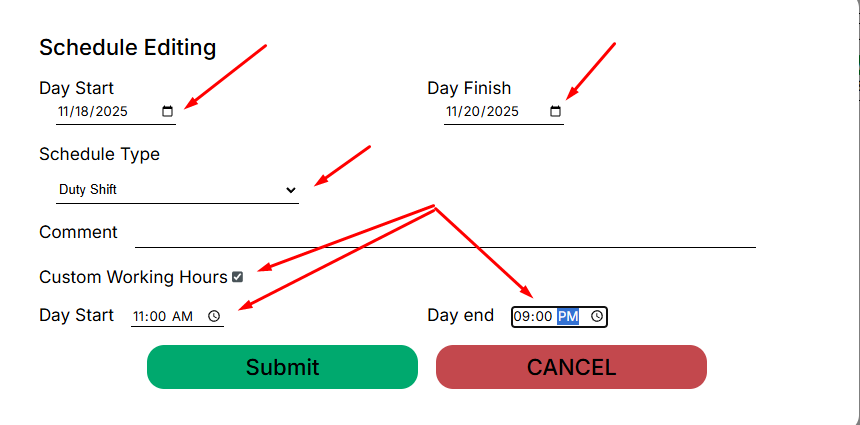
<span style="font-size: 12pt; font-family: Arial,sans-serif; color: #000000; background-color: transparent; font-weight: 400; font-style: normal; font-variant: normal; text-decoration: none; vertical-align: baseline; white-space: pre-wrap;">After that, an editing window for the schedule will open in front of you:</span>

[![](https://usrman.a-tracker.net/uploads/images/gallery/2025-09/scaled-1680-/image-1757687497813.png)](https://usrman.a-tracker.net/uploads/images/gallery/2025-09/image-1757687497813.png)

**<span style="font-size: 12pt; font-family: Arial,sans-serif; color: #000000; background-color: transparent; font-weight: 400; font-style: normal; font-variant: normal; text-decoration: none; vertical-align: baseline; white-space: pre-wrap;">In this window, you can:</span>**

**<span style="font-size: 12pt; font-family: Arial,sans-serif; color: #000000; background-color: transparent; font-weight: 400; font-style: normal; font-variant: normal; text-decoration: none; vertical-align: baseline; white-space: pre-wrap;">- select the days for applying a specific type of work schedule,</span>**

**<span style="font-size: 12pt; font-family: Arial,sans-serif; color: #000000; background-color: transparent; font-weight: 400; font-style: normal; font-variant: normal; text-decoration: none; vertical-align: baseline; white-space: pre-wrap;">- choose the type of work schedule,</span>**

**<span style="font-size: 12pt; font-family: Arial,sans-serif; color: #000000; background-color: transparent; font-weight: 400; font-style: normal; font-variant: normal; text-decoration: none; vertical-align: baseline; white-space: pre-wrap;">- leave a comment, if necessary (it will be visible to your supervisor),</span>**

**<span style="font-size: 12pt; font-family: Arial,sans-serif; color: #000000; background-color: transparent; font-weight: 400; font-style: normal; font-variant: normal; text-decoration: none; vertical-align: baseline; white-space: pre-wrap;">-specify a non-standard work schedule (if it involves a duty shift or if you have agreed on such a schedule with your supervisor).</span>**

<span style="font-size: 12pt; font-family: Arial,sans-serif; color: #000000; background-color: transparent; font-weight: 400; font-style: normal; font-variant: normal; text-decoration: none; vertical-align: baseline; white-space: pre-wrap;">To complete and save the added events, click “Submit”.</span>

<span style="font-size: 12pt; font-family: Arial,sans-serif; color: #000000; background-color: transparent; font-weight: 400; font-style: normal; font-variant: normal; text-decoration: none; vertical-align: baseline; white-space: pre-wrap;">To cancel the changes, press “Cancel”.</span>

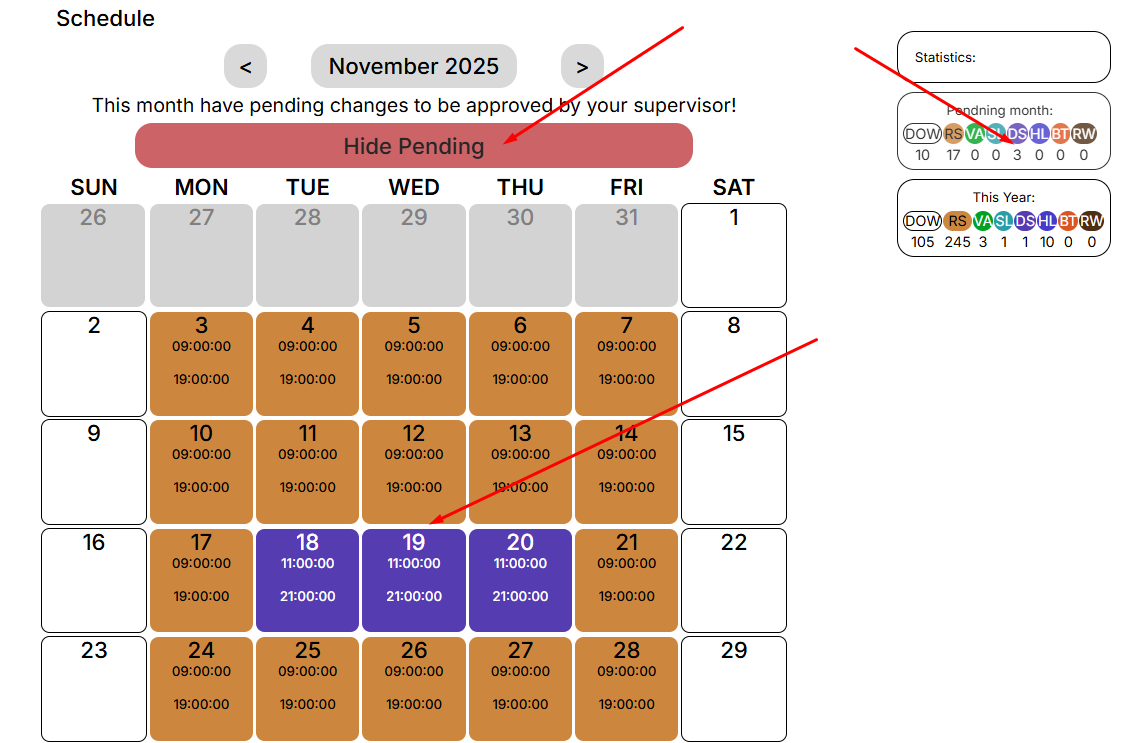
<span style="font-size: 12pt; font-family: Arial,sans-serif; color: #000000; background-color: transparent; font-weight: 400; font-style: normal; font-variant: normal; text-decoration: none; vertical-align: baseline; white-space: pre-wrap;">After you save the changes, you will be notified that you need to receive approval from your manager.</span>

[![](https://usrman.a-tracker.net/uploads/images/gallery/2025-09/scaled-1680-/image-1757687578053.png)](https://usrman.a-tracker.net/uploads/images/gallery/2025-09/image-1757687578053.png)

<span style="font-size: 12pt; font-family: Arial,sans-serif; color: #000000; background-color: transparent; font-weight: 400; font-style: normal; font-variant: normal; text-decoration: none; vertical-align: baseline; white-space: pre-wrap;">The statistics will display the number of selected days for each event.</span>

<span style="font-weight: normal;"> </span>

### <span style="font-size: 13.999999999999998pt; font-family: Arial,sans-serif; color: #434343; background-color: transparent; font-weight: bold; font-style: italic; font-variant: normal; text-decoration: none; vertical-align: baseline; white-space: pre-wrap;">Important: you cannot mark the days in the calendar retroactively.</span>

# An example of vacation planning

<span style="font-size: 12pt; font-family: Arial,sans-serif; color: #000000; background-color: transparent; font-weight: 400; font-style: normal; font-variant: normal; text-decoration: none; vertical-align: baseline; white-space: pre-wrap;">In this example, we are planning a vacation for the first days of June:</span>

<span style="font-size: 12pt; font-family: Arial,sans-serif; color: #000000; background-color: transparent; font-weight: 400; font-style: normal; font-variant: normal; text-decoration: none; vertical-align: baseline; white-space: pre-wrap;">1. Navigate to the “My Schedule” section, then scroll through the calendar to the desired month:</span>

[![](https://usrman.a-tracker.net/uploads/images/gallery/2024-07/scaled-1680-/image-1721299153673.png)](https://usrman.a-tracker.net/uploads/images/gallery/2024-07/image-1721299153673.png)

<span style="font-size: 12pt; font-family: Arial,sans-serif; color: #000000; background-color: transparent; font-weight: 400; font-style: normal; font-variant: normal; text-decoration: none; vertical-align: baseline; white-space: pre-wrap;">2. Highlight the dates of the planned vacation with the mouse cursor (for example, from the 7th to the 11th):</span>

[![](https://usrman.a-tracker.net/uploads/images/gallery/2024-07/scaled-1680-/image-1721307496700.png)](https://usrman.a-tracker.net/uploads/images/gallery/2024-07/image-1721307496700.png)

<span style="font-size: 12pt; font-family: Arial,sans-serif; color: #000000; background-color: transparent; font-weight: 400; font-style: normal; font-variant: normal; text-decoration: none; vertical-align: baseline; white-space: pre-wrap;">3. Mark the first week of June as vacation by selecting correct schedule type (</span><span style="font-size: 12pt; font-family: Arial,sans-serif; color: #000000; background-color: transparent; font-weight: 400; font-style: italic; font-variant: normal; text-decoration: none; vertical-align: baseline; white-space: pre-wrap;">important: you cannot mark the days retroactively</span><span style="font-size: 12pt; font-family: Arial,sans-serif; color: #000000; background-color: transparent; font-weight: 400; font-style: normal; font-variant: normal; text-decoration: none; vertical-align: baseline; white-space: pre-wrap;">):</span>

[![](https://usrman.a-tracker.net/uploads/images/gallery/2024-07/scaled-1680-/image-1721307741658.png)](https://usrman.a-tracker.net/uploads/images/gallery/2024-07/image-1721307741658.png)

<span style="font-size: 12pt; font-family: Arial,sans-serif; color: #000000; background-color: transparent; font-weight: 400; font-style: normal; font-variant: normal; text-decoration: none; vertical-align: baseline; white-space: pre-wrap;">4. After the desired period of vacation days has been marked, click “Submit” (if you do not want to save the changes, click “Cancel”, and the table will return to its last state):</span>

[![](https://usrman.a-tracker.net/uploads/images/gallery/2024-07/scaled-1680-/image-1721307840415.png)](https://usrman.a-tracker.net/uploads/images/gallery/2024-07/image-1721307840415.png)

<span style="font-size: 12pt; font-family: Arial,sans-serif; color: #000000; background-color: transparent; font-weight: 400; font-style: normal; font-variant: normal; text-decoration: none; vertical-align: baseline; white-space: pre-wrap;">5. After saving, you will be notified that the changes that have been made to the schedule have to be approved by your manager:</span>

[![](https://usrman.a-tracker.net/uploads/images/gallery/2024-07/scaled-1680-/image-1721308001574.png)](https://usrman.a-tracker.net/uploads/images/gallery/2024-07/image-1721308001574.png)

<span style="font-size: 12pt; font-family: Arial,sans-serif; color: #000000; background-color: transparent; font-weight: 400; font-style: normal; font-variant: normal; text-decoration: none; vertical-align: baseline; white-space: pre-wrap;">6. Notify your manager of schedule changes.</span>