# My Schedule


# Overview

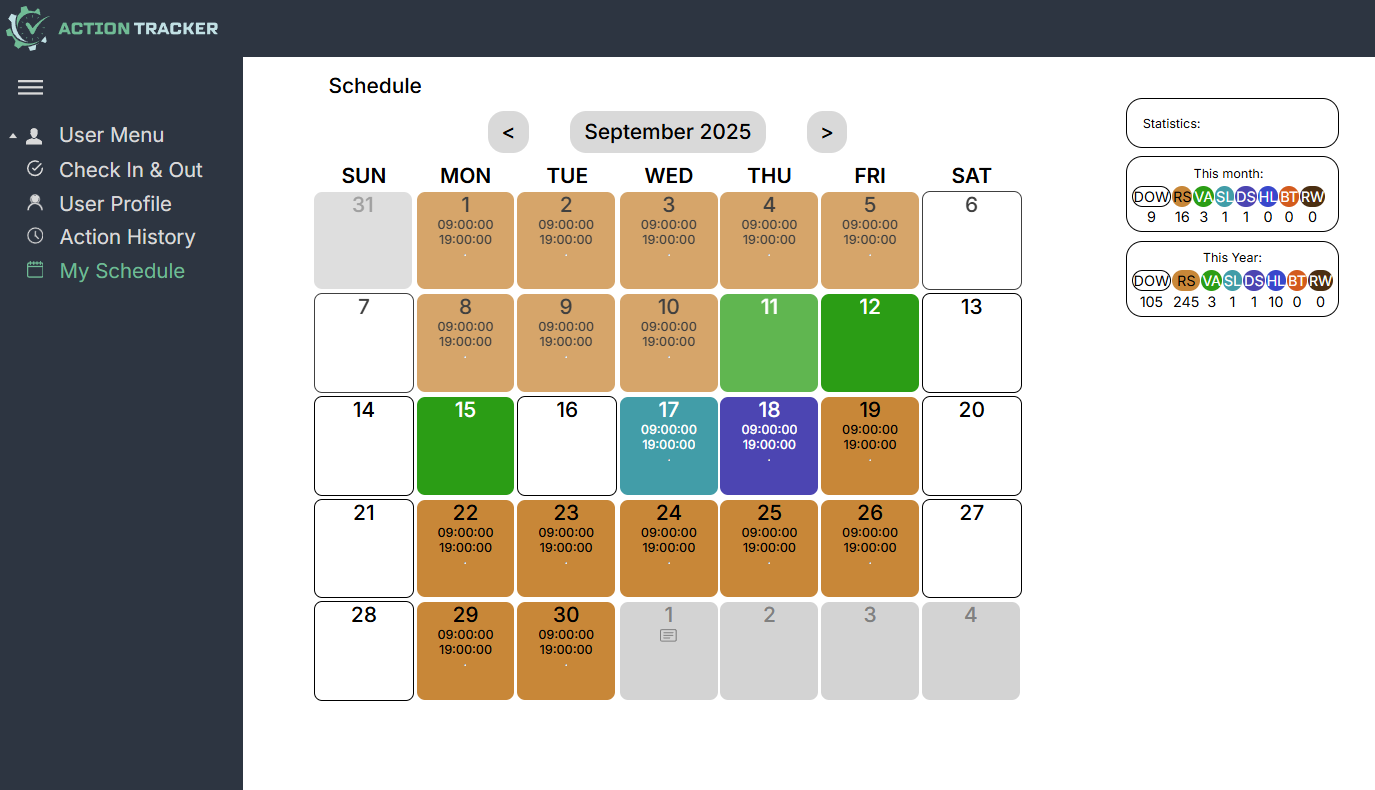
<span style="font-size: 12pt; font-family: Arial,sans-serif; color: #000000; background-color: transparent; font-weight: 400; font-style: normal; font-variant: normal; text-decoration: none; vertical-align: baseline; white-space: pre-wrap;">My Schedule section is intended to plan your schedule for the near future and gives you the opportunity to</span>

<span style="font-size: 12pt; font-family: Arial,sans-serif; color: #000000; background-color: transparent; font-weight: 400; font-style: normal; font-variant: normal; text-decoration: none; vertical-align: baseline; white-space: pre-wrap;">- mark days off (if your schedule differs from the standard),</span>

<span style="font-size: 12pt; font-family: Arial,sans-serif; color: #000000; background-color: transparent; font-weight: 400; font-style: normal; font-variant: normal; text-decoration: none; vertical-align: baseline; white-space: pre-wrap;">- mark regular shifts,</span>

<span style="font-size: 12pt; font-family: Arial,sans-serif; color: #000000; background-color: transparent; font-weight: 400; font-style: normal; font-variant: normal; text-decoration: none; vertical-align: baseline; white-space: pre-wrap;">- mark healthcare time,</span>

<span style="font-size: 12pt; font-family: Arial,sans-serif; color: #000000; background-color: transparent; font-weight: 400; font-style: normal; font-variant: normal; text-decoration: none; vertical-align: baseline; white-space: pre-wrap;">- plan vacations,</span>

<span style="font-size: 12pt; font-family: Arial,sans-serif; color: #000000; background-color: transparent; font-weight: 400; font-style: normal; font-variant: normal; text-decoration: none; vertical-align: baseline; white-space: pre-wrap;">- mark duty shifts,</span>

<span style="font-size: 12pt; font-family: Arial,sans-serif; color: #000000; background-color: transparent; font-weight: 400; font-style: normal; font-variant: normal; text-decoration: none; vertical-align: baseline; white-space: pre-wrap;">- mark specific schedules,</span>

<span style="font-size: 12pt; font-family: Arial,sans-serif; color: #000000; background-color: transparent; font-weight: 400; font-style: normal; font-variant: normal; text-decoration: none; vertical-align: baseline; white-space: pre-wrap;">- leave comments.</span>

[![](https://usrman.a-tracker.net/uploads/images/gallery/2025-09/scaled-1680-/image-1757687157880.png)](https://usrman.a-tracker.net/uploads/images/gallery/2025-09/image-1757687157880.png)

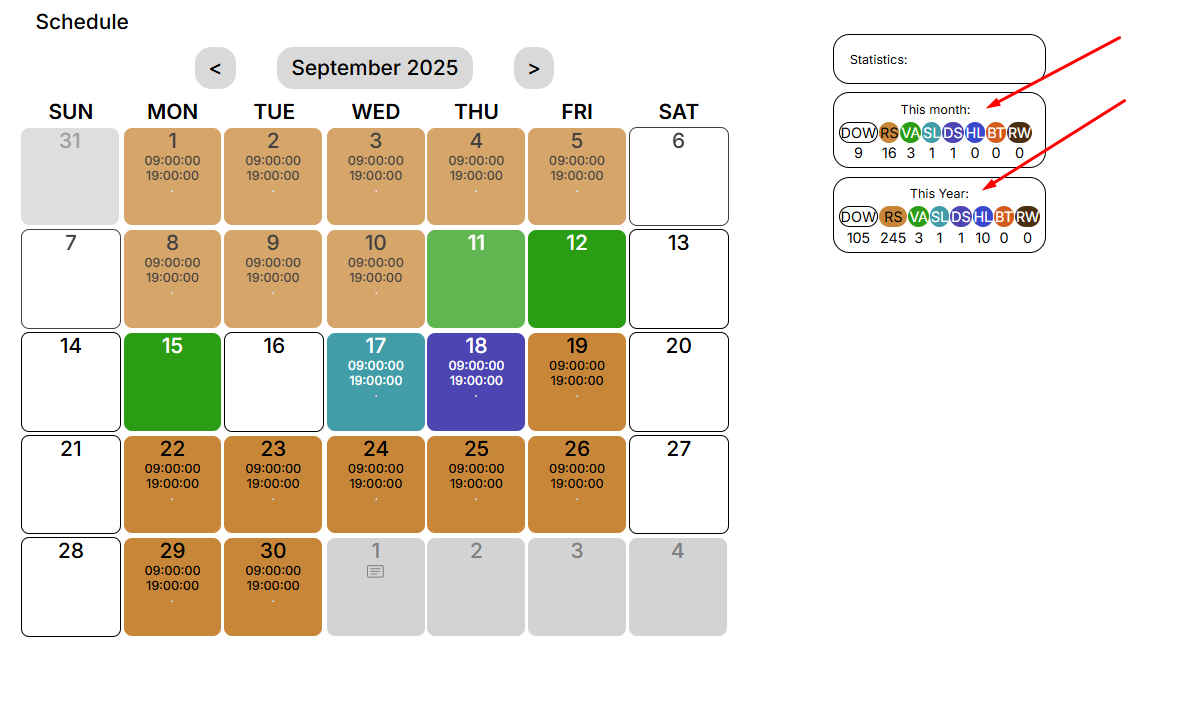
<span style="font-size: 12pt; font-family: Arial,sans-serif; color: #000000; background-color: transparent; font-weight: 400; font-style: normal; font-variant: normal; text-decoration: none; vertical-align: baseline; white-space: pre-wrap;">On the right are the monthly and annual statistics.</span>

[![](https://usrman.a-tracker.net/uploads/images/gallery/2025-09/scaled-1680-/image-1757687193345.png)](https://usrman.a-tracker.net/uploads/images/gallery/2025-09/image-1757687193345.png)

# Planning your schedule

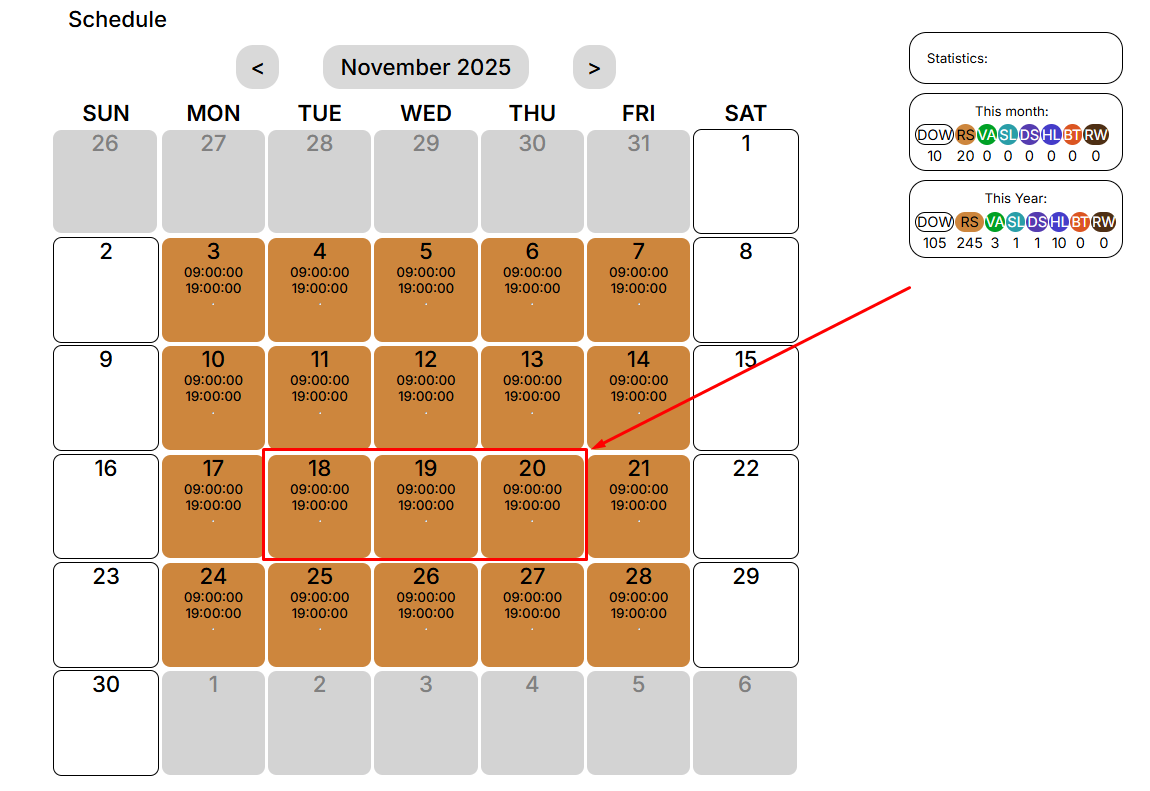
<span style="font-size: 12pt; font-family: Arial,sans-serif; color: #000000; background-color: transparent; font-weight: 400; font-style: normal; font-variant: normal; text-decoration: none; vertical-align: baseline; white-space: pre-wrap;">By choosing the type of days you want to schedule, you can specify the desired dates for the selected event. </span>

<span style="font-size: 12pt; font-family: Arial,sans-serif; color: #000000; background-color: transparent; font-weight: 400; font-style: normal; font-variant: normal; text-decoration: none; vertical-align: baseline; white-space: pre-wrap;">To do this, you need to select the day (or days) that interest you:</span>

[![](https://usrman.a-tracker.net/uploads/images/gallery/2025-09/scaled-1680-/image-1757687347535.png)](https://usrman.a-tracker.net/uploads/images/gallery/2025-09/image-1757687347535.png)

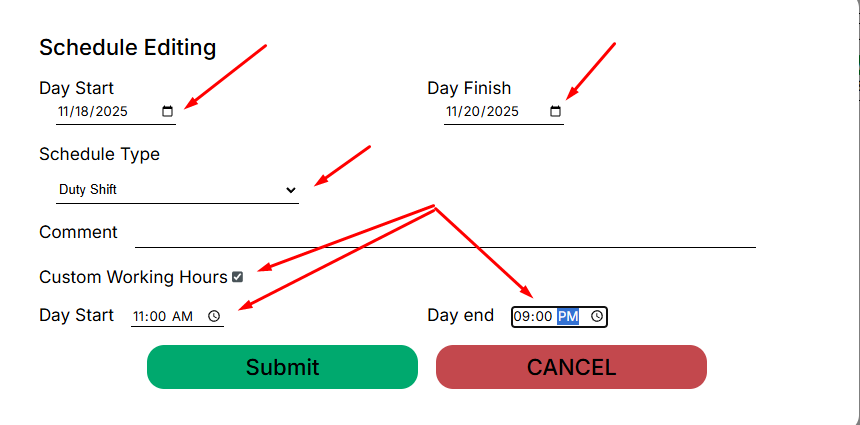
<span style="font-size: 12pt; font-family: Arial,sans-serif; color: #000000; background-color: transparent; font-weight: 400; font-style: normal; font-variant: normal; text-decoration: none; vertical-align: baseline; white-space: pre-wrap;">After that, an editing window for the schedule will open in front of you:</span>

[![](https://usrman.a-tracker.net/uploads/images/gallery/2025-09/scaled-1680-/image-1757687497813.png)](https://usrman.a-tracker.net/uploads/images/gallery/2025-09/image-1757687497813.png)

**<span style="font-size: 12pt; font-family: Arial,sans-serif; color: #000000; background-color: transparent; font-weight: 400; font-style: normal; font-variant: normal; text-decoration: none; vertical-align: baseline; white-space: pre-wrap;">In this window, you can:</span>**

**<span style="font-size: 12pt; font-family: Arial,sans-serif; color: #000000; background-color: transparent; font-weight: 400; font-style: normal; font-variant: normal; text-decoration: none; vertical-align: baseline; white-space: pre-wrap;">- select the days for applying a specific type of work schedule,</span>**

**<span style="font-size: 12pt; font-family: Arial,sans-serif; color: #000000; background-color: transparent; font-weight: 400; font-style: normal; font-variant: normal; text-decoration: none; vertical-align: baseline; white-space: pre-wrap;">- choose the type of work schedule,</span>**

**<span style="font-size: 12pt; font-family: Arial,sans-serif; color: #000000; background-color: transparent; font-weight: 400; font-style: normal; font-variant: normal; text-decoration: none; vertical-align: baseline; white-space: pre-wrap;">- leave a comment, if necessary (it will be visible to your supervisor),</span>**

**<span style="font-size: 12pt; font-family: Arial,sans-serif; color: #000000; background-color: transparent; font-weight: 400; font-style: normal; font-variant: normal; text-decoration: none; vertical-align: baseline; white-space: pre-wrap;">-specify a non-standard work schedule (if it involves a duty shift or if you have agreed on such a schedule with your supervisor).</span>**

<span style="font-size: 12pt; font-family: Arial,sans-serif; color: #000000; background-color: transparent; font-weight: 400; font-style: normal; font-variant: normal; text-decoration: none; vertical-align: baseline; white-space: pre-wrap;">To complete and save the added events, click “Submit”.</span>

<span style="font-size: 12pt; font-family: Arial,sans-serif; color: #000000; background-color: transparent; font-weight: 400; font-style: normal; font-variant: normal; text-decoration: none; vertical-align: baseline; white-space: pre-wrap;">To cancel the changes, press “Cancel”.</span>

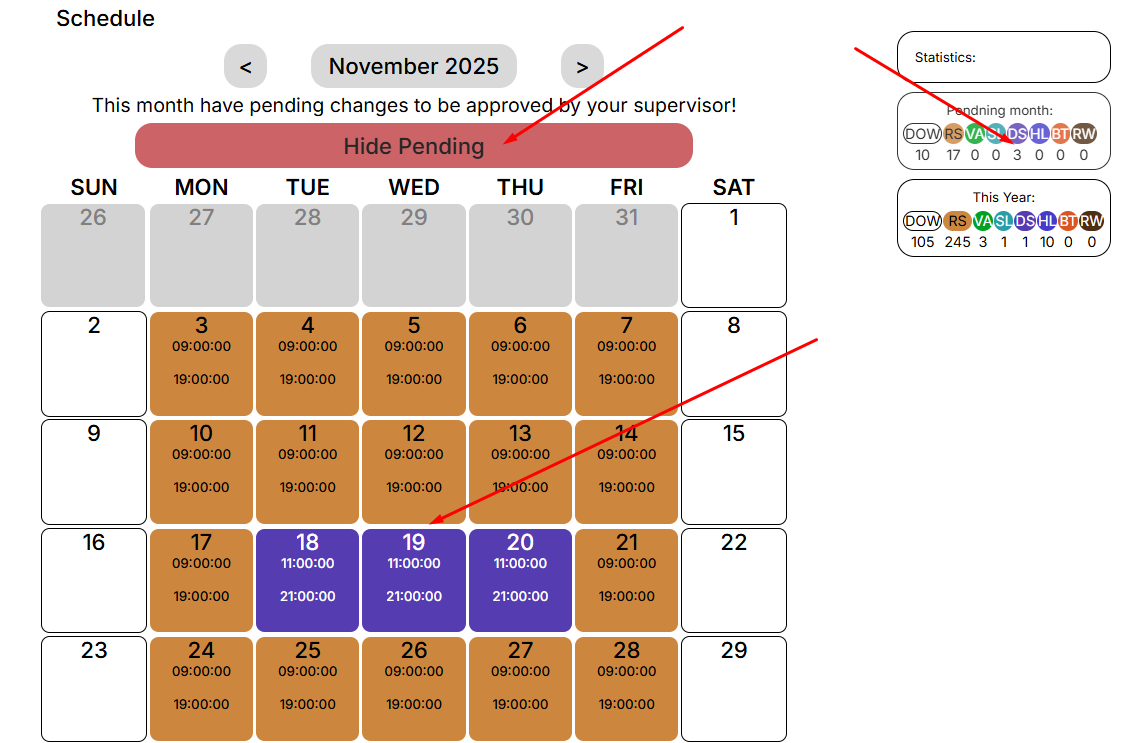
<span style="font-size: 12pt; font-family: Arial,sans-serif; color: #000000; background-color: transparent; font-weight: 400; font-style: normal; font-variant: normal; text-decoration: none; vertical-align: baseline; white-space: pre-wrap;">After you save the changes, you will be notified that you need to receive approval from your manager.</span>

[![](https://usrman.a-tracker.net/uploads/images/gallery/2025-09/scaled-1680-/image-1757687578053.png)](https://usrman.a-tracker.net/uploads/images/gallery/2025-09/image-1757687578053.png)

<span style="font-size: 12pt; font-family: Arial,sans-serif; color: #000000; background-color: transparent; font-weight: 400; font-style: normal; font-variant: normal; text-decoration: none; vertical-align: baseline; white-space: pre-wrap;">The statistics will display the number of selected days for each event.</span>

<span style="font-weight: normal;"> </span>

### <span style="font-size: 13.999999999999998pt; font-family: Arial,sans-serif; color: #434343; background-color: transparent; font-weight: bold; font-style: italic; font-variant: normal; text-decoration: none; vertical-align: baseline; white-space: pre-wrap;">Important: you cannot mark the days in the calendar retroactively.</span>

# An example of vacation planning

<span style="font-size: 12pt; font-family: Arial,sans-serif; color: #000000; background-color: transparent; font-weight: 400; font-style: normal; font-variant: normal; text-decoration: none; vertical-align: baseline; white-space: pre-wrap;">In this example, we are planning a vacation for the first days of June:</span>

<span style="font-size: 12pt; font-family: Arial,sans-serif; color: #000000; background-color: transparent; font-weight: 400; font-style: normal; font-variant: normal; text-decoration: none; vertical-align: baseline; white-space: pre-wrap;">1. Navigate to the “My Schedule” section, then scroll through the calendar to the desired month:</span>

[![](https://usrman.a-tracker.net/uploads/images/gallery/2024-07/scaled-1680-/image-1721299153673.png)](https://usrman.a-tracker.net/uploads/images/gallery/2024-07/image-1721299153673.png)

<span style="font-size: 12pt; font-family: Arial,sans-serif; color: #000000; background-color: transparent; font-weight: 400; font-style: normal; font-variant: normal; text-decoration: none; vertical-align: baseline; white-space: pre-wrap;">2. Highlight the dates of the planned vacation with the mouse cursor (for example, from the 7th to the 11th):</span>

[![](https://usrman.a-tracker.net/uploads/images/gallery/2024-07/scaled-1680-/image-1721307496700.png)](https://usrman.a-tracker.net/uploads/images/gallery/2024-07/image-1721307496700.png)

<span style="font-size: 12pt; font-family: Arial,sans-serif; color: #000000; background-color: transparent; font-weight: 400; font-style: normal; font-variant: normal; text-decoration: none; vertical-align: baseline; white-space: pre-wrap;">3. Mark the first week of June as vacation by selecting correct schedule type (</span><span style="font-size: 12pt; font-family: Arial,sans-serif; color: #000000; background-color: transparent; font-weight: 400; font-style: italic; font-variant: normal; text-decoration: none; vertical-align: baseline; white-space: pre-wrap;">important: you cannot mark the days retroactively</span><span style="font-size: 12pt; font-family: Arial,sans-serif; color: #000000; background-color: transparent; font-weight: 400; font-style: normal; font-variant: normal; text-decoration: none; vertical-align: baseline; white-space: pre-wrap;">):</span>

[![](https://usrman.a-tracker.net/uploads/images/gallery/2024-07/scaled-1680-/image-1721307741658.png)](https://usrman.a-tracker.net/uploads/images/gallery/2024-07/image-1721307741658.png)

<span style="font-size: 12pt; font-family: Arial,sans-serif; color: #000000; background-color: transparent; font-weight: 400; font-style: normal; font-variant: normal; text-decoration: none; vertical-align: baseline; white-space: pre-wrap;">4. After the desired period of vacation days has been marked, click “Submit” (if you do not want to save the changes, click “Cancel”, and the table will return to its last state):</span>

[![](https://usrman.a-tracker.net/uploads/images/gallery/2024-07/scaled-1680-/image-1721307840415.png)](https://usrman.a-tracker.net/uploads/images/gallery/2024-07/image-1721307840415.png)

<span style="font-size: 12pt; font-family: Arial,sans-serif; color: #000000; background-color: transparent; font-weight: 400; font-style: normal; font-variant: normal; text-decoration: none; vertical-align: baseline; white-space: pre-wrap;">5. After saving, you will be notified that the changes that have been made to the schedule have to be approved by your manager:</span>

[![](https://usrman.a-tracker.net/uploads/images/gallery/2024-07/scaled-1680-/image-1721308001574.png)](https://usrman.a-tracker.net/uploads/images/gallery/2024-07/image-1721308001574.png)

<span style="font-size: 12pt; font-family: Arial,sans-serif; color: #000000; background-color: transparent; font-weight: 400; font-style: normal; font-variant: normal; text-decoration: none; vertical-align: baseline; white-space: pre-wrap;">6. Notify your manager of schedule changes.</span>